
 HOME
HOME
ID : 1096
Login
Access
[AUX]-[Login]
Operation
1
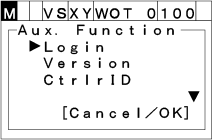
Press [AUX] to display [Auxiliary function option list].
2
Choose "Login" with the up and down cursor keys the press [OK]. "Login" screen shown below appears.
To abort setting, press [CANCEL].
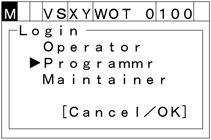
To log in with specified user level, choose the user level for login, then input the password and press [OK].
Password is as follows.
| [Operator] | 5593551 |
|---|---|
| [Programmer] | 5596045 |
| [Maintainer] | 5596060 |
If the user level is Operator or Programmer, the user level is maintained after the power off.
If the user level is Maintainer, the user level is not maintained after the power off. In this case, the user level will be Programmer after the power off.
To re-login together with changing user level from a higher level to a lower level, password is not required.
ID : 1096