
 HOME
HOME
ID : 1801
Displaying Message Log Screen
Operation path : Basic screen - [F11 MessageLog]
Press [F11 MessageLog] to display the following [Message Log] window.
Message log window will display the character strings specified by a message log command (PrintDbg, PrintMsg).
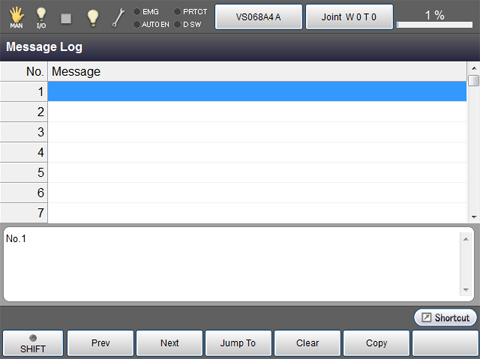
| Available function keys | |
|---|---|
| [F1 Prev] | Display the previous page of the currently displayed message list. |
| [F2 Next] | Display the next page of the currently displayed message list. |
| [F3 Jump To] | Numeric keypad will be displayed. Enter message number with numeric keypad, and press [OK] to display the target message. |
| [F4 Clear] | Select the message to delete, and press [Clear] to delete it. |
| [F5 Copy] | Copy the selected message. |
ID : 1801