
 HOME
HOME
ID : 2491
Monitoring of I/O and Hardware Status
Hardware and I/O status can be monitored with a teach pendant or WINCAPSIII.
Teach Pendant
Operation path : [F2 Arm] - [F12 Maintenance] - [F5 Safety Motion] - [F1 Monitor]
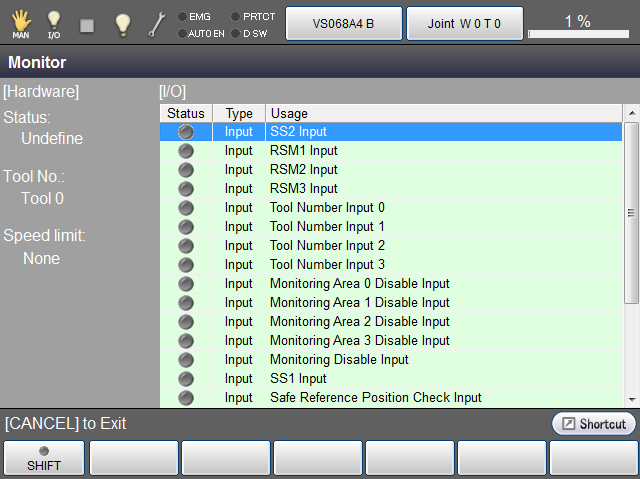
| Item | Content | |
|---|---|---|
| [Hardware] | Status: |
|
| Tool No.: |
|
|
| Speed limit: | SS2 input (0 mm/sec.), Display the lowest speed among RSM1 to RSM3.
Under the manual mode, the monitoring speed limit will be 250 mm/second regardless of the monitoring speed displayed. |
|
| [I/O] | Display the ON/OFF-state of each I/O. It turns green when the I/O is ON-state. | |
WINCAPSIII
Operation path : Menu [View] - [Safety motion monitor]
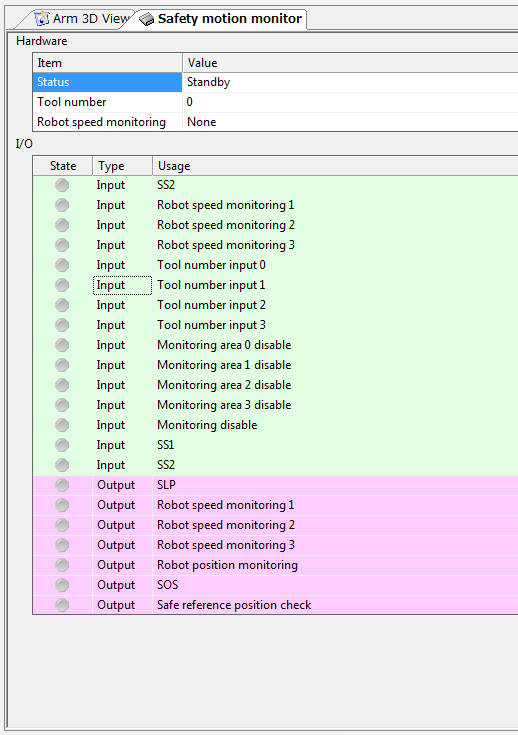
| Item | Content | |
|---|---|---|
| Hardware | Status |
|
| Tool number |
|
|
| Robot speed monitoring | SS2 input (0 mm/sec.), Display the lowest speed among RSM1 to RSM3.
Under the manual mode, the monitoring speed limit will be 250 mm/second regardless of the monitoring speed displayed. |
|
| I/O | Display the ON/OFF-state of each I/O. It turns green when the I/O is ON-state. | |
ID : 2491