
 HOME
HOME
ID : 2716
Setup
This section describes the setup procedure to communicate the IPC set for RC8 extension function and the RC8 series robot controller.
Setting for the PC
We recommend that you set up after updating Windows.
The initial language setting is set to Japanese. When changing the language, perform it in the Windows setting window.
1
Connect the customer-prepared power supply and the power cable of the IPC set for RC8 extension function to the cable of φ1.5.
2
Turn on the IPC set for RC8 extension function.
Once the login window is displayed, enter the followings.
| User name | Administrator |
|---|---|
| Password | 1 |
3
The IP address is set to the followings.
Set any IP address.
| IPAdress Port 1 | 192.168.0.1 |
|---|---|
| IPAdress Port 2 | 192.168.0.2 |
4
Set UWF to ON.
Setting for the Teach Pendant
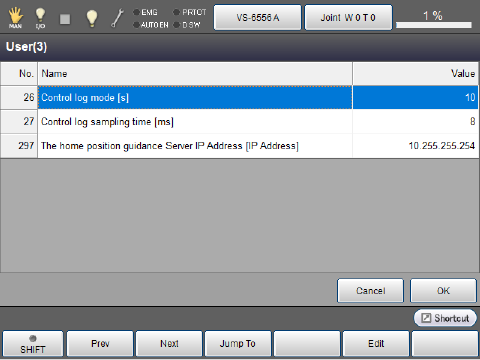
Operation path: [F2 Arm] - [F7 Origin return] - [F6 Setting]
Set "Control log mode", "Control log sampling time" and "The home position guidance Server IP Address".
ID : 2716