
 HOME
HOME
ID : 2896
Deleting Tracking Buffer Data
Data deleted from tracking buffer will differ depending on the argument specified in TrackTargetPos command.
In the image below, there are five workpieces on the sensor tracing turntable. Workpieces are conveyed from the upstream to the downstream, in the order from the Work 1 to Work 5. Once a workpiece passes through the sensor, data of the workpiece will be recorded in the tracking buffer. 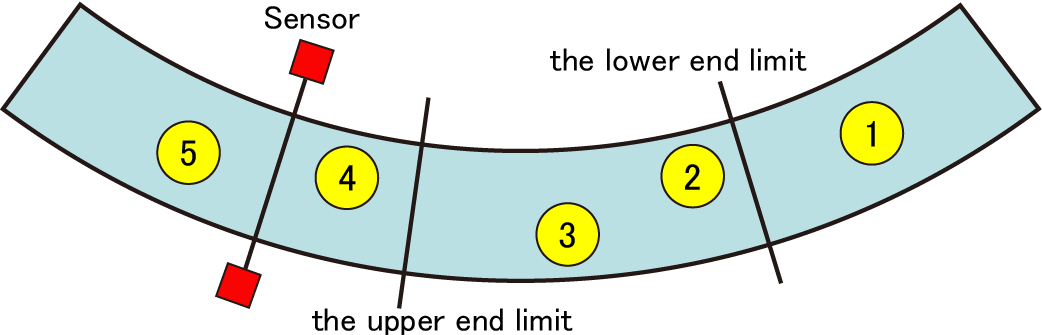
Before Executing TrackTargetPos
Data of the Work 1 to Work 4 are stored in the tracking buffer.
Data on the tracking buffer can be checked by TrackBufferIndexes command.
vIndex = TrackBufferIndexes(1, -1)
Value of vIndex : (1, 2, 3, 4)
After Executing TrackTargetPos(1,-1,-1)
Following workpiece data will be deleted.
- Data of workpieces that exist lower than end limit of the robot installed in the lowest position among all robots. (in this example, work 1)
- Workpiece data obtained by TrackTargetPos (In this example, work 2)
TrackTargetPos(1)
vIndex = TrackBufferIndexes(1, -1)
Value of vIndex : (3, 4)
When Tracking Buffer is Retained by TrackTargetPos(1.-1,-1,1)
Data of workpieces that exist lower than the lower end limit of the robot installed in the lowest position among all robots will be deleted.
To delete data obtained by TrackTargetPos command, use TrackTargetRelease command.
Case1
TrackTargetPos(1, -1, -1, 1)
vIndex = TrackBufferIndexes(1, -1)
Value of vIndex : (2, 3, 4)
Case2 : Obtaining index Number of the Target Data of TrackTargetPos
TrackTargetPos(1, -1, -1, 1)
vIndex = TrackBufferIndexes(1, 1)
Value of vIndex : (2)
ID : 2896