
 HOME
HOME
ID : 5666
External TCP Function
Overview
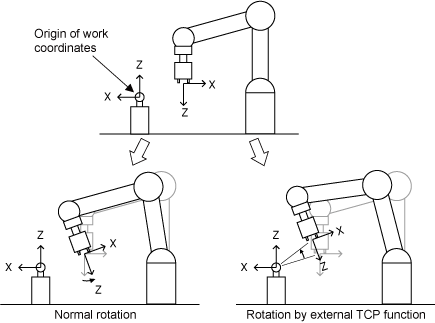
Ordinary rotary motion in the manual operation rotates the robot arm without changing the tool end coordinate whereas the rotary motion in External TCP function can rotate around the origin of the work coordinate specified.
This function is available in Ver.1.7.* or higher.
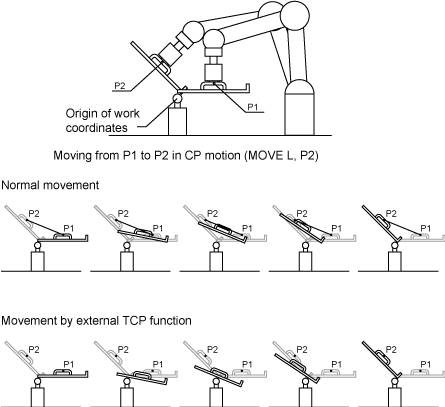
Because it reduces the teaching point when the robot performs CP motion (excluding circle) with workpiece, External TCP function is practical especially for de-burring with a fixed router, and sealing with a fixed caulking gun.
Usage
Activating External TCP Function
To enable the External TCP function, enter the License key in Option manager window of the Teach Pendant. For the way of entering license key, see Displaying and Adding/Deleting Function Extension Screen in the TEACH PENDANT OPERATION GUIDE.
For the way of obtaining license keys, see Optional Function and License.
Changing Attribute of the Work Coordinate
In the setting window of the work coordinate, select a work coordinate to be changed, and then change the attribute from Standard to FixedTool(Fix). For details, see Displaying and Setting Work Coordinates in the TEACH PENDANT OPERATION GUIDE.
Changing the Work Coordinate
In Choose MoveMode window of the teach pendant, select a work coordinate which attribute is FixedTool(Fix). External TCP function works if the robot is operated with an appropriate work coordinate being selected.
For details, see Displaying and Changing Mode Selection Screen in the TEACH PENDANT OPERATION GUIDE.
Temporary Change in Program
The work coordinates being selected and the attribute of the work coordinate can be temporarily changed in program.
This change will be revoked once the power supply turns off.
Temporary attribute change in program
Use Work command.
Temporary change of the work coordinates in program
Use ChangeWork command.
Precautions for Use
- Using External TCP motion requires the license.
- Attributes cannot be added to WORK0 (base coordinates).
- External TCP motion cannot be applied to the Extended joints.
- Performing the arc interpolation motion during the External TCP motion will result in an error.
- Executing Arrive command or WaitMotion command during the External TCP motion will result in an error.
- Singularity avoidance mode is ineffective even if it is enabled during the External TCP motion.
- Posture control is ineffective even if it is enabled during the External TCP motion.
- Conveyor tracking cannot be used together with the External TCP function.
- If you perform a teaching of the path point of the free curve interpolation on the External TCP motion only by means of the TOOL motion with the rotation movement centering X-, Y- or Z-axis, an error "8120141D "Division of path is required" may occur. When an error occurs, revise the position and posture of the path point.
ID : 5666