
 HOME
HOME
CntrlrID
Access
[AUX]-[CtrlrID]
Operation
1
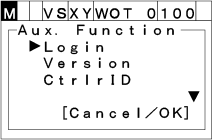
Press [AUX] to display [Auxiliary function option list].
2
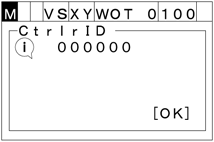
Choose "CtrlrID" with the up and down cursor keys the press [OK]. "Controller ID" screen shown below appears.
To abort setting, press [CANCEL].
[AUX]-[CtrlrID]
Press [AUX] to display [Auxiliary function option list].
Choose "CtrlrID" with the up and down cursor keys the press [OK]. "Controller ID" screen shown below appears.
To abort setting, press [CANCEL].