
 HOME
HOME
Folders
A project uses the following file hierarchy.
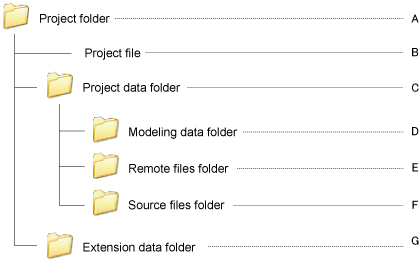
A: Project Folder
This holds all files for the project.
Its name becomes the project name.
B: Project File
This file, with file extension .wpj. contains data on the project overall.
Double-clicking this file opens the corresponding project. (File extension: .wpj)
C: Project Data Folder
This folder holds the data for the project.
Its name becomes the project name.
D: Modeling Data Folder
This folder holds 3D modeling data for the project.
E: Remote Files Folder
If there is a robot controller on line, the software spools robot controller files here.
F: Source Files Folder
This folder holds the programs, header files, and teach pendant (TP) panels for the project.
The Project window displays its contents.
G: Extension Data Folder
This folder holds data which is necessary for the robot controller, such as the Field Bus information.