
 HOME
HOME
Preparation of Hardware
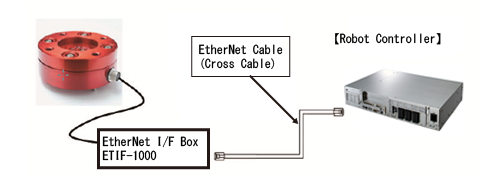
Use the force sensor Dyn-Pick, manufactured by WACOH-TECH Inc.
Connect the EtherNet I/F box of the force sensor Dyn-Pick to the robot controller with EtherNet cross cable.
For detailed information about the force sensor Dyn-Pick, refer to the user's manual of "Kinesthetic Sensor Dyn-Pick" manufactured by WACOH-TECH Inc.
- Periodically check the force sensor.
- If the connection is established through switching hubs or a router, communication errors may occur.
Installation of The Sensor
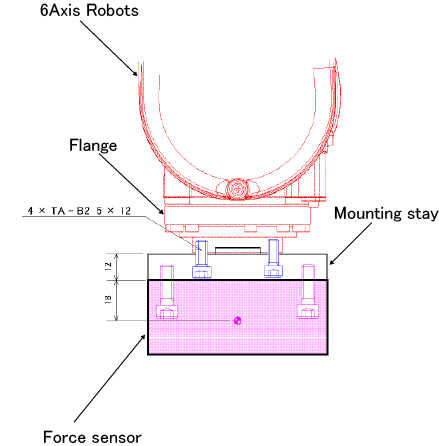
To install the sensor, you need to prepare a mounting stay beforehand.
For the sensor mounting stay for WACOH-TECH, refer to "Mounting Stay of the Force Sensor Dyn-Pick"(pdf:381KB)
Precautions on Using PoE Force Sensor
If you use an coaxial cable to connect the PoE Force sensor with an EtherNet connector, refer to "Diagram for the PoE Force Sensor Mounting Stay" for the way of arranging the mounting stay.
Using this stay will result in the incoherent between the robot tool end’s coordinate and the force sensor’s coordinates. To compensate this difference, set +135° to the sensor mounting position’s Rz coordinate.