
 HOME
HOME
ID : 9043
Pallet.CalcPos
Function
Specify the pallet conditionsk, stack count and the target position number to retrieve the desired position.
Syntax
Pallet.CalcPos(P1_P3 divisions,P1_P2 divisions,Height of one stack,pallet 4-corner position P1,pallet 4-corner position P2,pallet 4-corner position P3,pallet 4-corner position P4,pallet target position number[, Stack count])
Guaranteed Entry
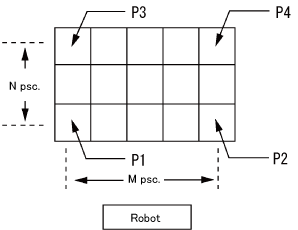
- P1_P3 divisions
- Specify the number of divisions on the P1-P3 direction (N) by integer type data.
- P1_P2 divisions
- Specify the number of divisions on the P1-P2 direction (M) by integer type data.
- Height of one stack
- Specify the height of one stack by single precision real number type data. The position of the height of pallet is calculated by [Height of one stack]*([Stack count]-1). If pallets are piled up successively, enter a positive value.
If pallets successively diminish in number, enter a negative value.
When you use the [Stack count] with 1 always, this value is not available. Enter "0". - Pallet 4-corner position P1
- Specify the first position in the four corners by position type data.
- Pallet 4-corner position P2
- Specify the second position in the four corners by position type data.
- Pallet 4-corner position P3
- Specify the third position in the four corners by position type data.
- Pallet 4-corner position P4
- Specify the fourth position in the four corners by position type data.
- Pallet target position number
- Specify the target position number that is counted from the first position of the stack by integer type data.
- Stack count
- Specify the stack count from the first stack by integer type data.
This should be "1" if this is omitted.
Return Value
Return a target position by position type data.
Description
Specify the pallet conditions, stack count and the target position number to retrieve the desired position.
Pallet conditions to specify are; P1-P3 division (N), P1-P2 division (M), stack height, and pallet four corners (P1 to P4).
Pallet position numbers are assigned from P1 to P2 and after P2, subsequent numbers are assigned from P1 plus 1 to P3 horizontally as indicated in the figure.

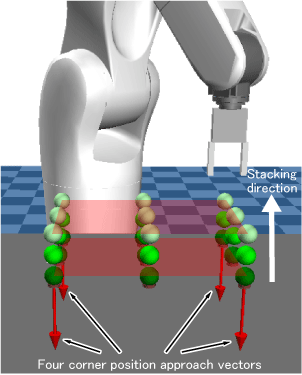
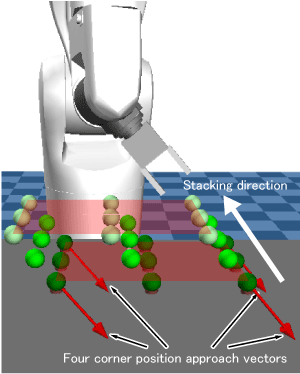
The height of one stack increases in the negative direction to the approach vectors at the four corner positions (P1-P4) of a pallet (hereinafter called “four corner position approach vectors”).
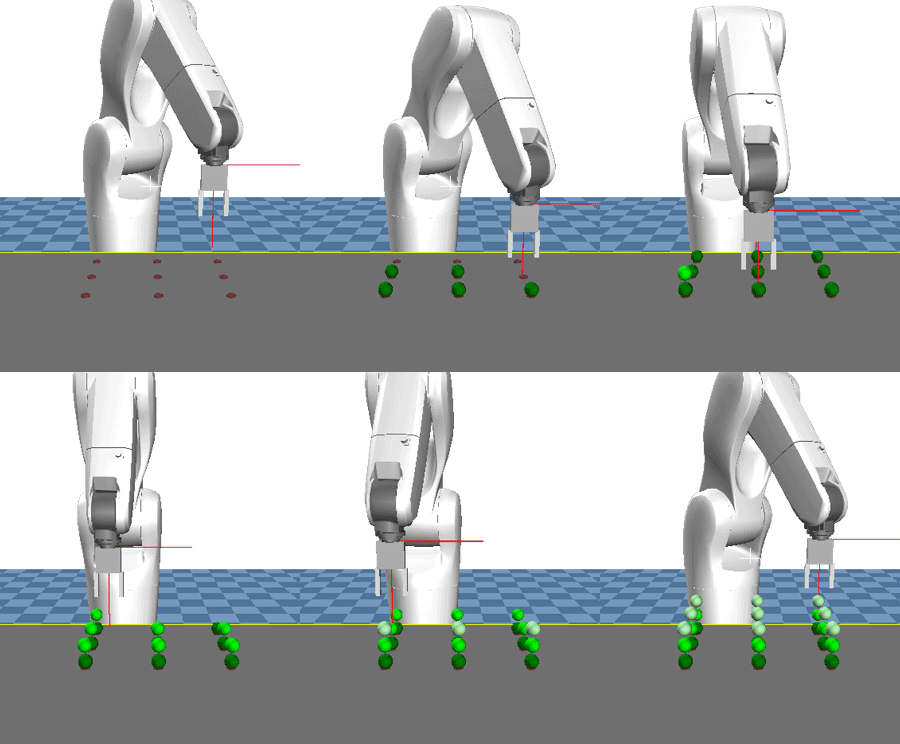
For example, when the four corner position approach vectors face in the vertically downward direction to the XY plane of the base coordinates, the height of one stack increases in the vertically upward direction from the XY plane (Example 1).
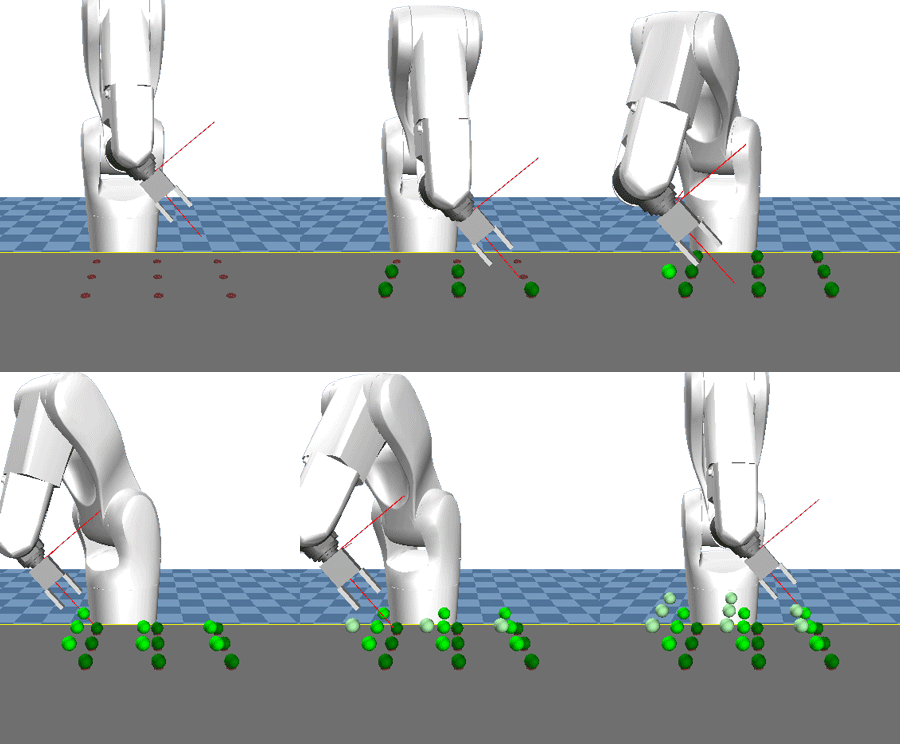
When the four corner position approach vectors face in the obliquely downward direction to the XY plane of the base coordinates, the height of one stack increases in the obliquely upward direction from the XY plane (Example 2).
Consider the height direction of stacking as well to teach the four corner positions (P1-P4) of a pallet.
In the following movies, a robot moves to positions specified by return values of Pallet.CalcPos command, and then sphere-shaped objects appear at those positions.
Example 1
Example 2
Related Terms
Attention
-
Example
'!TITLE "Acquiring Coordinate Position of Pallet Target Position Number"
' Acquire coordinate position designated by pallet target position number and display it on
the message output window
Sub Sample_PalletCalcPos

  Dim aaa As Position
  Dim bbb As Position
  Dim ccc As Position
  Dim ddd As Position
  Dim eee As Position
  Dim fff As Position
  Dim ggg As Position

  ' Assign position indicating pallet four corner position P1 to aaa
  aaa = P( 600, -100, 50, -180, 0, 180, 5 )

  ' Assign position indicating pallet four corner position P2 to bbb
  bbb = P( 600, 100, 50, -180, 0, 180, 5 )

  ' Assign position indicating pallet four corner position P3 to ccc
  ccc = P( 400, -100, 50, -180, 0, 180, 5 )

  ' Assign position indicating pallet four corner position P4 to ddd
  ddd = P( 400, 100, 50, -180, 0, 180, 5 )

  ' Assign coordinate position of pallet target position number 1 to eee
  eee = Pallet.CalcPos( 3, 5, 20, aaa, bbb, ccc, ddd, 1, 1 )

  ' Display coordinate position of pallet target position number 1 on the message output window
  PrintDbg eee

  ' Assign coordinate position of pallet target position number 8 to fff
  fff = Pallet.CalcPos( 3, 5, 20, aaa, bbb, ccc, ddd, 8, 1 )

  ' Display coordinate position of pallet target position number 8 on the message output window
  PrintDbg fff

  ' Assign coordinate position of pallet target position number 15 to ggg
  ggg = Pallet.CalcPos( 3, 5, 20, aaa, bbb, ccc, ddd, 15, 1 )

  ' Display coordinate position of pallet target position number 15 on the message output window
  PrintDbg ggg

End Sub
ID : 9043