
 HOME
HOME
ID : 9483
Registering License
At installation, the "License Manager" dialog box will appear.
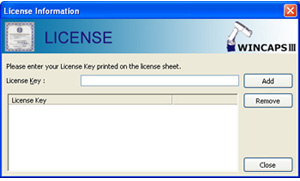
Click the [Add] button on the "License Manager" dialog box.
The license registration window will appear. Enter the license key printed on the license included with the product, and click the [OK] button.
Input the license key printed on the installation disc label for Light or Trial versions.
If the user ID appears under License Key, press the Close button.
- Skipping over this license registration process loads WINCAPSIII in test drive mode with limited functionality.
- To register at a later date, choose Help|License... to display the above dialog box.
The installer may take a while before starting installation of WINCAPSIII because it installs necessary components as shown below.
- ORiN2SDK : Components for communication
- VRC : Components for simulation
- VRC9 : Simulation engine for RC9 controller
ID : 9483