
 HOME
HOME
ID : 9544
Communication Setting
Once the connection between WINCAPSIII and a robot controller completes, perform communication setting of WINCAPSIII.
For further details on configuring the robot controller, please refer to "Displaying and Changing Communication Settings Screen" in Smart TP Operation Guide.
1
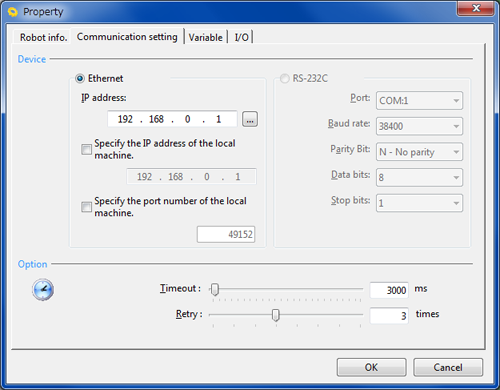
From the menu bar, click Connect, click Connect Setting to display the Communication setting tab on Property dialog box.
2
Configure the link.
- Ethernet connection
Specify IP address of the robot controller.
For information about IP address setting of the robot controller, refer to "Connecting and Transmitting Data to PC" in Basic of Robot Motion Creation.
Serial (RS-232C) connection function is exclusive functions for the RC7M controller and not available for the RC9 robot controller.
3
Enter values in [Timeout] and [Retry].
4
Press the OK button to save the new settings.
ID : 9544