
 HOME
HOME
ID : 9582
Arm Operation
This window is for moving the simulated robot in the Arm 3D view window.
For functions that cannot be used depending on models, items will be disabled.
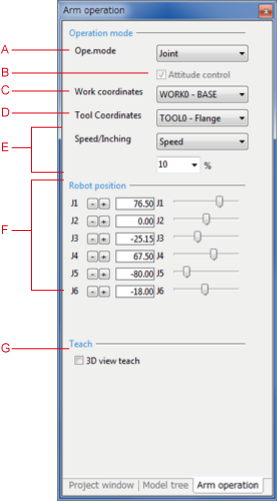
Description of the Drop-down Menu
A: Ope. Mode
Select movement mode.
- Axes: operates all axes.
- XY-bisection: moves according to the selected work coordinates. RX/RY/RZ rotate around the work coordinates centered on the tool origin point.
- Tool: moves according to the selected tool coordinates. RX/RY/RZ rotate around the work coordinates centered on the tool origin point.
B: Attitude control
This option enables/disables the Attitude control function under X-Y mode or TOOL mode operation.
C: Work Coordinates
Select work coordinates.
D: Tool Coordinates
Select tool coordinates.
E: Speed/Inching
Select normal running or inching.
- Speed: While the "Move position" button is held down, the corresponding robot joint continuously moves at the specified speed (%).
- Inching: Each time the "Move position" button is pressed, the corresponding robot joint inches by the specified amount of movement (mm or degree).
F: Move Position Buttons
Moves the robot displayed in Arm 3D view in accordance with the selected movement mode.
G: 3D View Teach
Teaches the posture symmetry to the surface when clicking an object within the Arm 3D view window.
ID : 9582