
 HOME
HOME
ID : 9991
Simplified Tool Coordinates Definition
Overview
Mounting an actual tool on the robot flange and teaching the same point more than one times (multiple point teaching) enable the tool coordinates to be defined.
If you prefer more simple teaching methods, please refer to "Setting Tool Coordinates by Easy Teaching" of Smart TP Operation Guide.
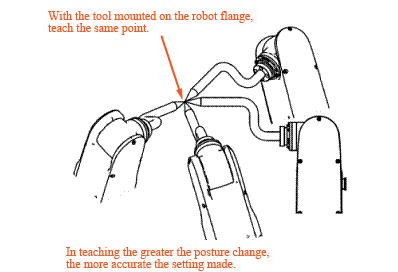
|
Checking the Tool Coordinates Defined
Switch the operation mode to Tool and select the defined tool. Confirm that the tool end does not move when running the robot to change only its posture without motion of Rx or Ry. If the tool end greatly moves, make tool coordinates definition again.
ID : 9991