
 HOME
HOME
ID : 10262
Connection between Camera and Controller
This section describes how to connect hardware.
Connection of Hardware
The way of connection differs depending on the camera used.
USB camera: Connect the camera to a USB port of the robot controller.
Basler GigE camera or Canon Network camera: Connect the camera to a LAN port of the robot controller through a hub when you setup. When you use the camera, directly connect the camera to the LAN port of the robot controller.
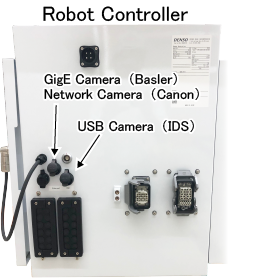
Preparation for Hardware Connection
Before using RC Vision, following preparation are required.
Controller and Computer Connection, IP Address Setting
Connect computer to controller. Specify each IP address so as to communicate the computer and controller each other. For details about IP address setting of controller, refer to "Displaying and Changing Communication Settings Screen" in the Smart TP Operation Guide.
ID : 10262