
 HOME
HOME
ID : 10270
Image Processing Application
For RC8 series, an image processing application can be used by using a camera connected. Available applications are "EVP2" and "EIS".
- EVP2 : Processes a pick-and-place operation image.
- EIS : Stores the connected camera images into a computer automatically.
Applications "EVP2" and "EIS" are included in "RC Vision" software package.
For details, refer to the application's manual.
| Application | Description |
|---|---|
| EVP2 | EVP2 is a software that supports necessary configurations for image processing without programming when a robot corrects its position with a vision device. This software offers enhanced functionality and several times greater processing power than the EVP application, while maintaining the same ease of operation. Images are processed with a camera connected to the controller. To set the image processing, EVP2 Guidance is used. This application will be installed in the computer. When in operation, only controller and a camera connected to controller can be operated. To correct robot’s position with a vision device, Camera-Robot calibration should be executed. Users can use calibration wizard which is included in EVP2 Guidance for this calibration. Also, EVP2 equips a function to output the parts distribution status in the detection area. Using this function enables you to control parts movement with any customer-prepared device, such as a feeder. 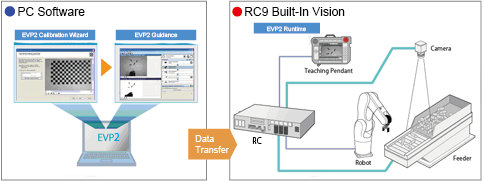
EVP2 is available to a robot controller with Ver.1.0.* or higher. To use EVP2, you need to register each license below. If you do not have a license, please purchase the license.
|
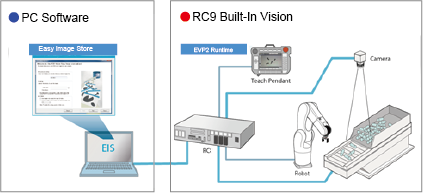
| EIS | EIS is a software that stores RC8 series-connected camera images into a computer. Images taken by Built-in Vision (EVP) are temporarily stored in robot controller (hereafter, RC8 series), and reset by the controller power-off. By using EIS, these images are automatically stored in your computer as image files.
To use EIS, you need to register a license below. If you do not have a license, please purchase the license.
|
From the following URL, access DENSO WAVE Industrial Robot website and you can download "RC Vision".
If you register a trial license key, you can try an image processing application even you do not have a license (Trial period: three months).
Member registration is required to download and acquire licenses.
https://www.denso-wave.com/en/robot/product/software/RCVision.html
ID : 10270