
 HOME
HOME
ID : 10360
Outline of I/O Command Processing
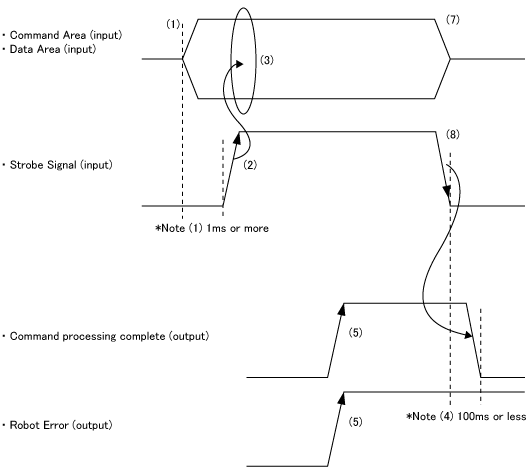
I/O commands to be executed are processed as shown below.
 |
-
Set a command area and a data area (if necessary) for the command execution I/O signal from the external device to the robot controller.
The data to be set must be defined at least 1 ms before the Strobe Signal is turned ON -
After completion of setting, turn the Strobe Signal ON.
The command input with a Strobe Signal should be preceded by the output of the Robot Initialized.
However, if an error occurs in a robot, the Robot Initialized will be turned OFF. When you execute the Clear Robot Error, make it a condition that the Robot Error has been output, not the Robot Initialized.
- When the Strobe Signal is turned ON, the controller reads the command area and the data area.
- The controller starts processing based on the command read.
-
After completion of command processing, the controller turns ON the Command Processing Completed signal. If an error has occurred during processing, a Robot Error signal will be outputted together with the Command Processing Completed signal.
If the Strobe Signal is turned OFF before the Command Processing Completed signal is turned ON, the Command Processing Completed signal will be output and then turned OFF within 100 ms - The PLC waits until the Command Processing Completed signal is input. In this case, confirm that no error exists with the robot.
- The PLC turns OFF the command and data areas and the Strobe Signal.
-
As soon as the Strobe Signal is turned OFF, the controller turns OFF the Command Processing Completed signal. The Robot Error signal, which is outputted due to a command processing error, remains ON until Clear Robot Error (001) is executed.
The maximum allowable time from when the Strobe Signal is turned OFF until the Command Processing Completed signal is turned OFF, is 100 ms.
ID : 10360