
 HOME
HOME
ID : 10410
Change Battery
Function
This signal turns ON when the encoder battery maintenance date has passed.
The encoder battery maintenance date is checked with the smart TP.
From the top screen, press [F6 Setting] - [F7 Date and Maintenance]-[F3 Encoder Battery].
Usage
You can check the encoder battery maintenance date without a smart TP.
ON Condition
This signal is ON when the encoder battery maintenance date has passed.
OFF Condition
This signal is OFF when the encoder battery maintenance date is not arrived yet.
Timing Chart
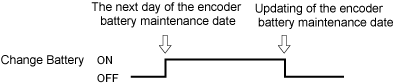 |
ID : 10410