
 HOME
HOME
ID : 10641
Connect Motor and Encoder Cables
A robot controller connects to a robot through a motor & encoder cable.
There are two types of the motor & encoder cable. One is for the motor power, the other is for the encoder.
- For the motor power: 300 mm or more
- For the encoder: 230 mm or more
Ensure the following bending radii (internal) of the motor & encoder cables are maintained. Excessively bending will result in broken lead wires.
Connection in Robot Side
If the connector on the robot controller side has been connected, check if the robot controller is power-off, and then start operation.
How to Connect Motor & Encoder Cable (for Power Source)
1
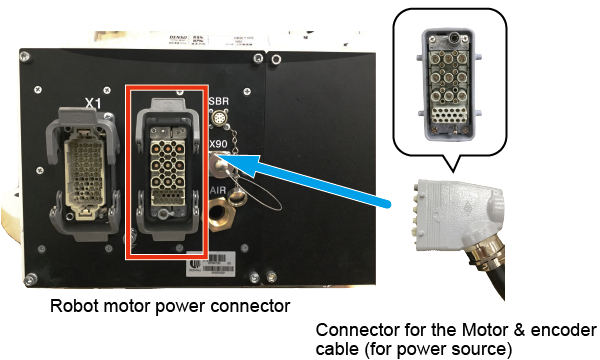
Motor & encoder cable (for power source) has two connectors; one is black and the other is gray.
For the connection on the robot side, use the black connector.
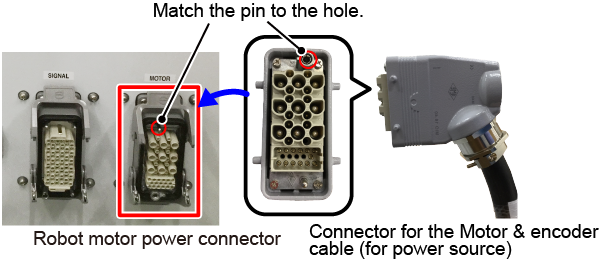
Check and match the right and left side of the black connector of the motor & encoder cable (for power source) and the robot motor power connector.
The connector cannot be plugged in if it connected wrong way.
2
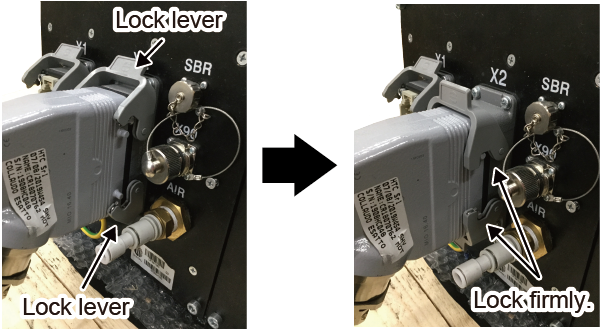
Plug the black connector of the motor & encoder cable (for power source) in the connector of the robot power source connector straightway then lock with two lock levers.
How to Connect Motor & Encoder Cable (for Encoder)
1
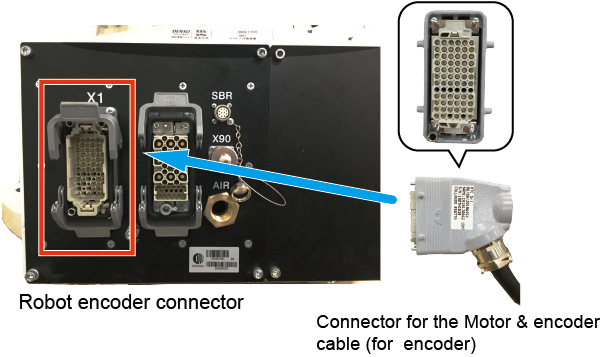
Motor & encoder cable (for encoder) has two connectors; one is black and the other is gray.
For the connection on the robot side, use the black connector.
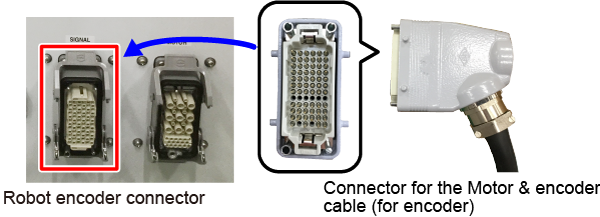
Check and match the right and left side (projected part and the recessed part within the connector) of black connector of the motor & encoder cable (for encoder) and the robot encoder connector.
The connector cannot be plugged in if it connected wrong way.
2
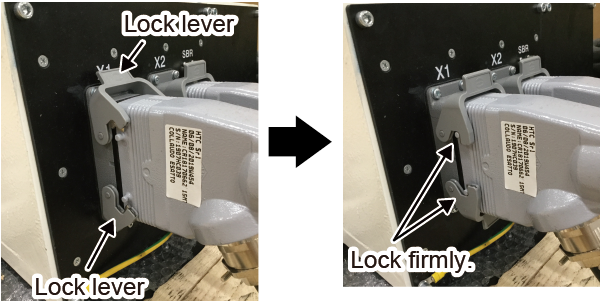
Plug the black connector of the motor & encoder cable (for encoder) in the connector of the robot encoder connector straightway then lock with two lock levers.
Connection on the Robot Controller Side
Make sure that the power of robot controller is OFF before starting settings.
How to Connect Motor & Encoder Cable (for Power Source)
1
Check and match the up and down side of the gray connector of the motor & encoder cable (for power source) and the robot motor power connector.
The connector cannot be plugged in if it connected wrong way.
2
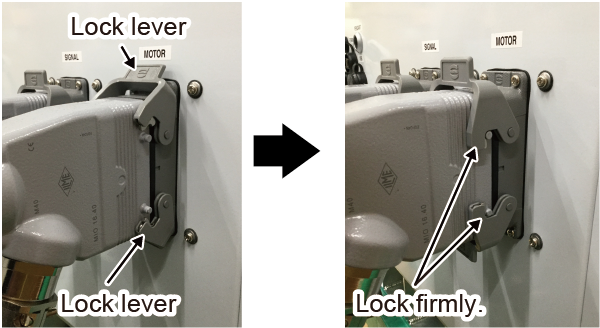
Plug the gray connector of the motor & encoder cable (for power source) in the connector of the robot motor power connector straightway then lock with two lock levers.
How to Connect Motor & Encoder Cable (for Encoder)
1
Check and match the up and down side of gray connector of the motor & encoder cable (for encoder) and the robot encoder connector.
The connector cannot be plugged in if it connected wrong way.
2
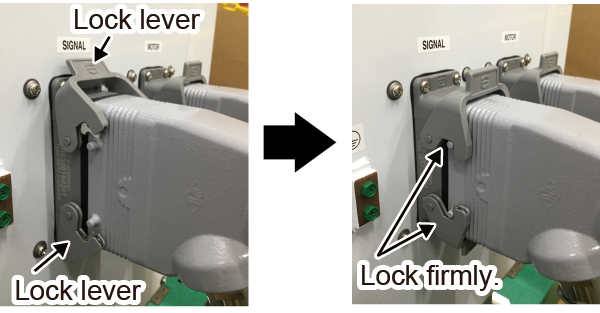
Plug the gray connector of the motor & encoder cable (for encoder) in the robot encoder connector straightway then lock with two lock levers.
ID : 10641