
 HOME
HOME
ID : 1099
Licensing Functions
Operation Path
[AUX]-[Option]-[Extension]
Operation Procedure
License lists
1
Press [AUX] to display [Aux. Function].
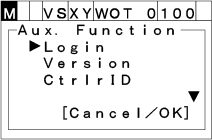
2
Choose "Option" with the up and down cursor keys and then press [OK].
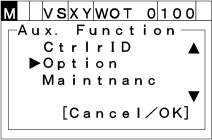
3
Choose "Extension" and then press [OK].
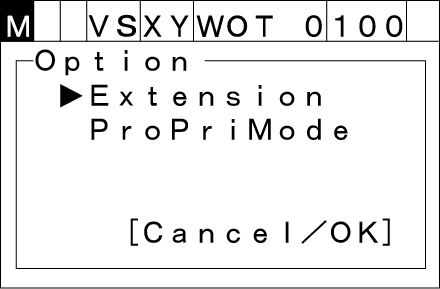
License list setting window appears as shown below.
To abort setting, press [CANCEL].
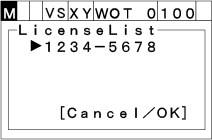
If no selectable license key exists,the following message appears.
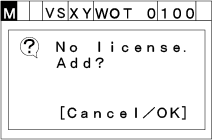
Function menu
Press [OK] on the License list setting window to call up the "Function menu list" as shown below.
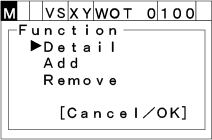
Differences according to the user level are shown below.
| Detail | Add | Remove | |
|---|---|---|---|
| Operator | ● | - | - |
| Programmer | ● | ● | - |
| Maintainer | ● | ● | ● |
License details
Choose "Detail" with the up and down cursor keys and then press [OK]. Detail information window appears as shown below.
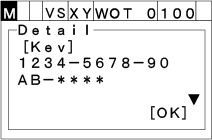
Differences according to the user level are shown below.
- -License key
- -License state
- -Registration date (for fixed-term license only)
- -Expiration date (for fixed-term license only)
Differences according to the user level are shown below.
| License key display | |
|---|---|
| Operator | 1234-5678-90AB-**** |
| Programmer,Maintainer | 1234-5678-90AB-CDEF |
Add License
Choose "Add" with the up and down cursor keys and then press [OK]. "Add License" window appears as shown below.
To abort setting, press [CANCEL].
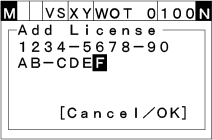
Input alphanumerics with numeric input keys and then press [OK] to confirm the license addition.
To abort setting, press [CANCEL].
When license addition fails, "Add License" window displays again.
When license addition fails, following messages appear.
| Messages | |
|---|---|
| License cannot be handled by the teach pendant | The license is not allowed. |
| When fixed-term license has expired | Invalid license. |
| When addition successfully complete | Success! |
Remove the License
Choose "Remove" with the up and down cursor keys and then press [OK]."License delete confirmation" window appears as shown below.
To abort setting, press [CANCEL].
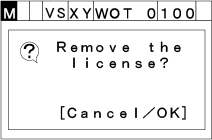
If the license delete fails, the following message appears.
| Messages | |
|---|---|
|
When delete is prohibited (User level is "Maintenance" or lower and fixed- term license) |
Removing is not allowed. |
| When delete successfully complete | Success! |
ID : 1099