
 HOME
HOME
ID : 1766
Displaying and Setting Variable Size
Operation path : [F3 Variable] - [F12 Aux] - [F1 Number of Variables]
Set the number of variables.
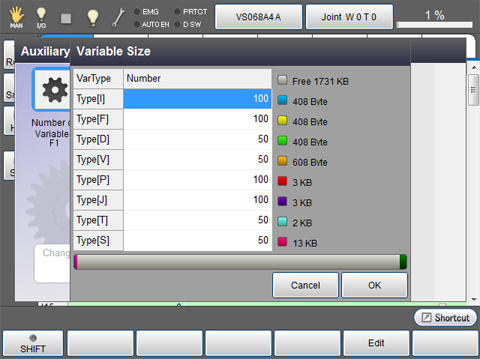
Press [F1 Number of Variables] to display the following [Variable Size] window.
A bar on the bottom of the Variable size window illustrates rate of used variables.
Only the rate of static variable is appeared from the right side of the bar.
| Available function keys | |
|---|---|
| [F5 Edit] |
Select the variable to change its variable size, and press [Edit] to display numeric keypad. Enter the value to set with numeric keypad, and press [OK] to change the variable size. Press [OK] key in [Variable Size] window to confirm the changed value. |
ID : 1766