
 HOME
HOME
ID : 1775
Displaying System Information (Controller Tab)
Operation path : [F6 Setting] - [F2 System Info] - [Controller tab]
Display currently used CPU state, memory size and disk size, and product information.
Press [Controller tab] to display the following [System Info] window.
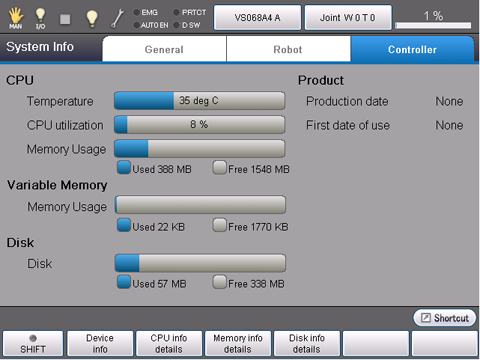
| Available function keys | |
|---|---|
| [F1 Device info] | Display the information of extension board mounted on the controller. |
| [F2 CPU info details] | Display the information of CPU. |
| [F3 Memory Info details] | Display usage conditions of global variables and static variables of controller. |
| [F4 Disk Info details] | Display the information of controller archived storage.(Auxiliary storage device to retain data even the power supply of the controller turns off.) |
ID : 1775