
 HOME
HOME
ID : 1799
Hand Main Screen
Route : Basic screen - [F9 Hand]
Display the operation screen of the electric gripper.
To open the hand main screen shown below, press [F9 Hand]
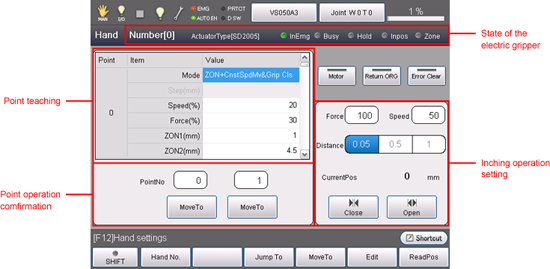
State of the Electric Gripper
| Display | Description |
|---|---|
| Number [ ] | Display the hand number (0 to 3) of the currently selected electric gripper. |
| Actuator type[ ] | Display the actuator type of the electric gripper. |
| InEmg | Display the E-STOP state of the electric gripper. |
| Busy | Display the operation state |
| Hold | Display gripping state |
| Inpos | Display inpos state |
| Zon | Zone state |
Point Teaching
| Display | Description |
|---|---|
| Point | Display the point number. |
| Mode | Select move mode. |
| Step(mm) | Range : Minus/Plus software limit range (mm). |
| Speed(%) | Set the velocity. The range of the velocity is different from move mode. To input the velocity, click the box to display the numerical keypad. |
| Force(%) | Set the gripping force. |
| ZON1 | To set ZON range, input ZON 1 and ZON 2. |
| ZON2 | To set ZON range, input ZON 1 and ZON 2. |
Point Operation Confirmation
Two point numbers are selectable in this option.
| Display | Description |
|---|---|
PointNo |
Set the point to operate. |
Inching Operation Setting
| Display | Description |
|---|---|
| Force | Specify the gripping force when inching. |
| Speed | Specify the speed when inching. |
| Distance | Specify the moving distance when inching. |
| CurrentPos | Display the current position (unit:mm) |
| Close | Execute an opening movement |
| Open | Execute a closing movement |
Other Buttons
| Display | Description |
|---|---|
| Motor | Execute motor turn On/Off |
| Return ORG | In the first execution, calculate an origin then return to origin. From the second time, return to origin. |
| Error Clear | Clear errors. |
Available Function Keys
| Available function key | |
|---|---|
| [F1 Hand No.] | Specify the hand number. |
| [F3 Jump] | To input the point number, click the key to display the numerical keypad. Then specify the point number and press [OK] to display the specified point number. |
| [F4 MoveTo] | Execute the point operation which is selected by the point number. To change the point number, press [F3 Jump to]. |
| [F5 Edit] | Change the move mode, moving distance and other settings in each points. To edit the setting. select the item then click [Edit] to display the options list or numerical keypad. Select or input the desired item/number to change the setting. |
| [F12 Aux] | Set the initial settings or parameter settings of the electric gripper. |
ID : 1799