
 HOME
HOME
ID : 1803
Displaying and Changing External Speed Setting Screen
Operation path : [SPEED] key on the teach pendant
Set external speed.
Press [SPEED] key on the teach pendant to display the following [Speed] window.
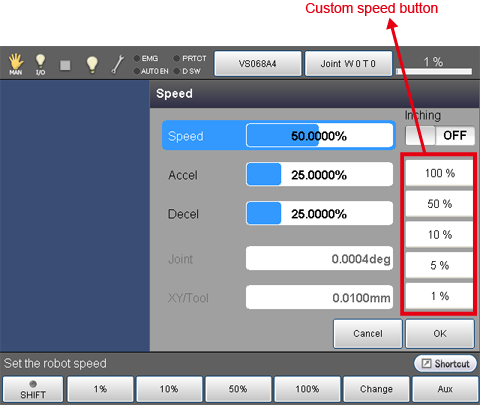
Change the value by selecting an item.
To select an item, the following ways are available.
| How to select an item | |
|---|---|
| Way 1 | Touch [SPEED], [ACCEL] or [DECEL] on the screen. |
| Way 2 | Press up- and down-arrow keys. |
To change the value, the following ways are available.
To confirm the change, press [OK] on the Speed window after you change the value.
| How to change the value | |
|---|---|
| Way 1 | Specify a value by numerical value. (See [F5 change] shown below) |
| Way 2 | Press the function key corresponding to the numerical value. (See [Available function keys] shown below) |
| Way 3 | Press the desired custom speed button. Custom speed buttons are placed on the rightmost of the Speed window. You can set arbitrary values to the custom speed buttons. (See [F6 Aux] shown below) |
| Way 4 | Press right and left arrow keys. The value changes by 5%. |
| Way 5 | Use the jog dial. The value changes by 2%. |
| Way 6 | Touching a ratio indicator bar on the right side of Speed, Accel or Decel enables you to change the ratio being touched. Ratio is set according to the point being touched; for example, touching the ratio indicator bar at three-fourths from the left will set about 75%. If you touch an item which is currently unselected, the item touched will be selected. |
| Available function keys | |
|---|---|
| [F1 1%] |
Select items, "SPEED", "ACCEL" or "DECEL", and press [1%]. Then, the display for settings will be changed to 1%. |
| [F2 10%] |
Select items, "SPEED", "ACCEL" or "DECEL", and press [10%]. Then, the display for settings will be changed to 10%. |
| [F3 50%] |
Select items, "SPEED", "ACCEL" or "DECEL", and press [50%]. Then, the display for settings will be changed to 50%. |
| [F4 100%] |
Select items, "SPEED", "ACCEL" or "DECEL", and press [100%]. Then, the display for settings will be changed to 100%. |
| [F5 Change] |
Select items, "SPEED", "ACCEL" or "DECEL", and press [Change]. Then, numeric keypad will be displayed. Enter the value to set with numeric keypad, and press [OK] to change the display for settings to the entered value. |
| [F6 Aux] |
[Aux] window is displayed. |
ID : 1803