
 HOME
HOME
ID : 2972
LED Display
- The front panel of EtherCAT master board (selective extended joint)
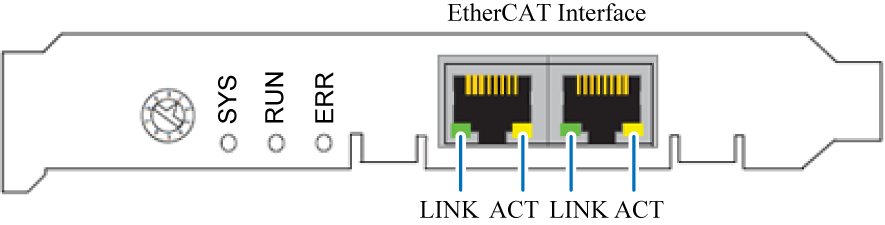
| LED Name | Color | Indicator State | Status |
|---|---|---|---|
| SYS | Green | ON | Board is normal state |
| Green / Yellow | Blinking | Board is running | |
| Yellow | ON | Board is running | |
| - | OFF | Power supply is not confirmed. (Power supply to the robot controller is OFF) |
|
| RUN | - | OFF | INIT-state |
| Green | ON | OPERATIONAL-state | |
| Blinking | PRE-OPERATIONAL-state or SAFE-OPERATIONAL-state | ||
| ERR | - | OFF | No error is confirmed |
| Red | Blinking | Setting error or the Watch dog is time out. | |
| LINK | Green | ON | Ethernet connection is confirmed. |
| - | OFF | Ethernet connection is not confirmed. | |
| ACT | Yellow | Blink | Under data transmission |
After the controller startup, if the LED that indicates ACT does not light, cable disconnection or contact failure in connector is expected. Check the communication interface.
ID : 2972