
 HOME
HOME
[NPN type, Mini I/O dedicated mode] Mini I/O Pin Assignment
The table below lists the pin assignment of Mini I/O(NPN type) in Mini I/O dedicated mode.
For Safety-I/O-less Version
View from the cable side |
||||||||
| Terminal No. (*1) | Signal name | Port No. | Wire color | Terminal No. (*1) | Signal name | Port No. |
Wire color |
|
|---|---|---|---|---|---|---|---|---|
| 1 | Enable Auto (Internal +24V) (input) | - | Black | 35 | Enable Auto (input) | - |
Pink |
|
| 2 | External Emergency Stop 1, b-1 (input) (Internal +24V) | - | Brown | 36 | External Emergency Stop 1, b-2 (input) | - |
Pink |
|
| 3 | External Emergency Stop 2, b-1 (input) (Internal +24V) | - | Red | 37 | External Emergency Stop 2, b-2 (input) | - |
Pink |
|
| 4 (*2) | Protective Stop 1, -1 (input) | - | Orange | 38 (*2) | Protective Stop 1, -2 (input) | - |
Pink |
|
| 5 (*2) | Protective Stop 2, -1 (input) | - | Yellow | 39 (*2) | Protective Stop 2, -2 (input) | - |
Pink |
|
| 6 | Reserved. | - | Black | 40 | Reserved. | - |
White |
|
| 7 | Reserved. | - | Brown | 41 | Reserved. | - |
White |
|
| 8 | Deadman SW 1, -1 (output) [Enable SW 1, -1] (Mini relay) | - | Red | 42 | Deadman SW 1, -2 (output) [Enable SW 1, -2] (Mini relay) | - |
White |
|
| 9 | Deadman SW 2, -1 (output) [Enable SW 2, -1] (Mini relay) | - | Orange | 43 | Deadman SW 2, -2 (output) [Enable SW 2, -2] (Mini relay) | - |
White |
|
| 10 | - | - | Yellow | 44 | - |
- |
White |
|
| 11 | Step Stop (All tasks) (System input) | 0 | Green | 45 | CPU Normal (System output) | 16 |
White |
|
| 12 | Strobe Signal (System input) | 1 | Blue | 46 | Robot Running (System output) | 17 |
White |
|
| 13 | Data area bit 0 (System input) | 2 | Violet | 47 | Robot Error (System output) | 18 |
White |
|
| 14 | Data area bit 1 (System input) | 3 | Gray | 48 | Robot Initialized (System output) | 19 |
White |
|
| 15 | Data area bit 2 (System input) | 4 | Pink | 49 | Auto Mode (System output) | 20 |
White |
|
| 16 | Command area bit 0 (System input) | 5 | Black | 50 | Operation Preparation Completed (System output) | 21 |
Gray |
|
| 17 | Command area bit 1 (System input) | 6 | Black | 51 | Battery Warning (System output) | 22 |
Violet |
|
| 18 | Command area bit 2 (System input) | 7 | Brown | 52 | Command Processing Completed (System output) | 23 |
Violet |
|
| 19 | User input | 8 | Red | 53 (*3) | User output/ Continue Start Permission (System output) | 24 |
Violet |
|
| 20 | User input | 9 | Orange | 54 | User output | 25 |
Violet |
|
| 21 | User input | 10 | Yellow | 55 | User output | 26 |
Violet |
|
| 22 | User input | 11 | Green | 56 | User output | 27 |
Violet |
|
| 23 | User input | 12 | Blue | 57 | User output | 28 |
Violet |
|
| 24 | User input | 13 | Gray | 58 | User output | 29 |
Violet |
|
| 25 | User input | 14 | Pink | 59 | User output | 30 |
Violet |
|
| 26 | User input | 15 | Brown | 60 | User output | 31 |
Gray |
|
| 27 | - | - | Red | 61 | - | - |
Gray |
|
| 28 (*4) | Pendant Emergency Stop 1, b-1 (output) (Dry output) | - | Orange | 62 (*4) | Pendant Emergency Stop 1, b-2 (output) (Dry output) | - |
Gray |
|
| 29 (*4) | Pendant Emergency Stop 2, b-1 (output) (Dry output) | - | Yellow | 63 (*4) | Pendant Emergency Stop 2, b-2 (output) (Dry output) | - |
Gray |
|
| 30 | Reserved. | - | Green | 64 | Reserved. | - |
Gray |
|
| 31 | - | - | Blue | 65 | - | - |
Gray |
|
| 32 |
DC power input +24V (when external power source is used) DC power output +24V (when internal power source is used) |
- | Pink | 66 |
DC power input 0V (when external power source is used) DC power output 0V (when internal power source is used) |
- |
Gray |
|
| 33 | - | Black | 67 | - |
Blue |
|||
| 34 | - | Brown | 68 | - |
Blue |
|||
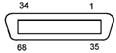
*1 : The optional I/O cable for the above connector consists of twisted pair wires--pairs of #1 and #35, #2 and #36, #34 and #68.
*2 : If no Protective Stop input signals are needed, short-circuit by terminal connection with jumpers between #4 and #38 and between terminals #5 and #39.
*3 : This item differs depending on "User or System output setting" of I/O parameters. Default setting is user output.
*4 : When emergency stop output signal is used as the replacement from RC7M, separate 28-62 and 29-63 for use.
The reserved pins and output pins should be prevented from direct contact with other pins or conductive part. Direct contact could result in a controller failure or damage.
To use Pendant Emergency Stop output signals, be sure to supply 24 V to terminals #28 and #29.