
 HOME
HOME
Setting the Reduced Ratios of the Programmed Speed, Acceleration, and Deceleration
There are a programmed speed and a reduced ratio for VS series robots.
The programmed speed is the speed set with a command in a program.
The reduced ratio is the speed set from the teach pendant or mini-pendant by setting a ratio (%) of the maximum speed (programmed speed).
Note on Speed Setting
- The default reduced ratios at powering on are 1%.
- Once the reduced speeds are set, they will remain in effect until the robot controller is turned off or new settings are made.
-
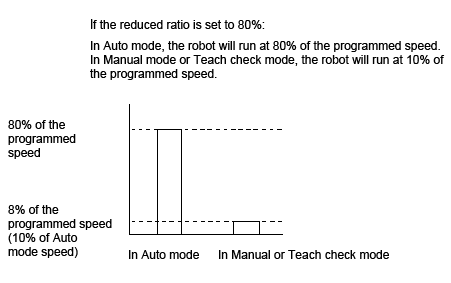
In Auto mode, the robot will run at the (programmed speed x reduced ratio (%)). If the reduced ratio is set to 80%, the robot will run at 80% of the programmed speed.
In Manual mode or Teach check mode, the robot controller is designed to run the robot at 10% of the programmed speed. If the reduced ratio is 80%, therefore, the robot will run at 10% x 80% of the programmed speed, that is, at 8%, as shown in the figure below. -
If the reduced ratio of the programmed speed is set, the robot controller automatically calculates the reduced ratios of the programmed acceleration and deceleration according to the formulas below.
Reduced ratio for acceleration (%) = (Reduced ratio for speed)2 /100
Reduced ratio for deceleration (%) = (Reduced ratio for speed)2 /100
(Example) If the reduced ratio for speed is 20%
Reduced ratio for acceleration = 202/100 = 4 %
If the automatically calculated ratios (%) is modified manually from the teach pendant or mini-pendant, then the most recently modified ratios will take effect.
 |