HOME
HOME
Move to the Position Specified by Variable (only for J type, T type, and P type)
Operation path : [F3 Variable] - [F4 Move To]
Specify the variable number in the variables of J type, T type, and P type, and then manually move the robot to the registered coordinate value in the specified variable number.
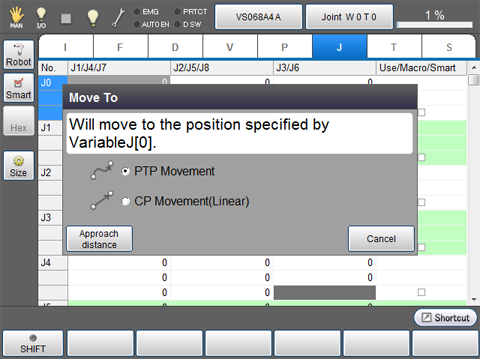
Specify the variable number of the registered coordinate value, where robot moves to, and press [F4 Move To] to display the following [Move To] window.
Select if the robot should be moved to the target coordinate value by "PTP Movement" or "CP Movement (Linear)".
Then, press deadman switch to confirm that motor is turned on. Set the motion speed of robot, and keep pressing [OK] key of teach pendant.
If [OK] key is released before robot reaches to the target coordinate, robot will stop. If it stopped in the middle of operation, perform the same operation procedure to move the robot from the position where it stopped to the target position.