
 HOME
HOME
Setting up Master/Slave Controllers
Configure each controller as master or slave.Once a master controller is configured, register slave controllers in the master controller.
Setting up Master/Slave Controllers
Operation path : Basic screen - [F2 Arm] - [F6 Aux] - [F11 Exclusive Control]
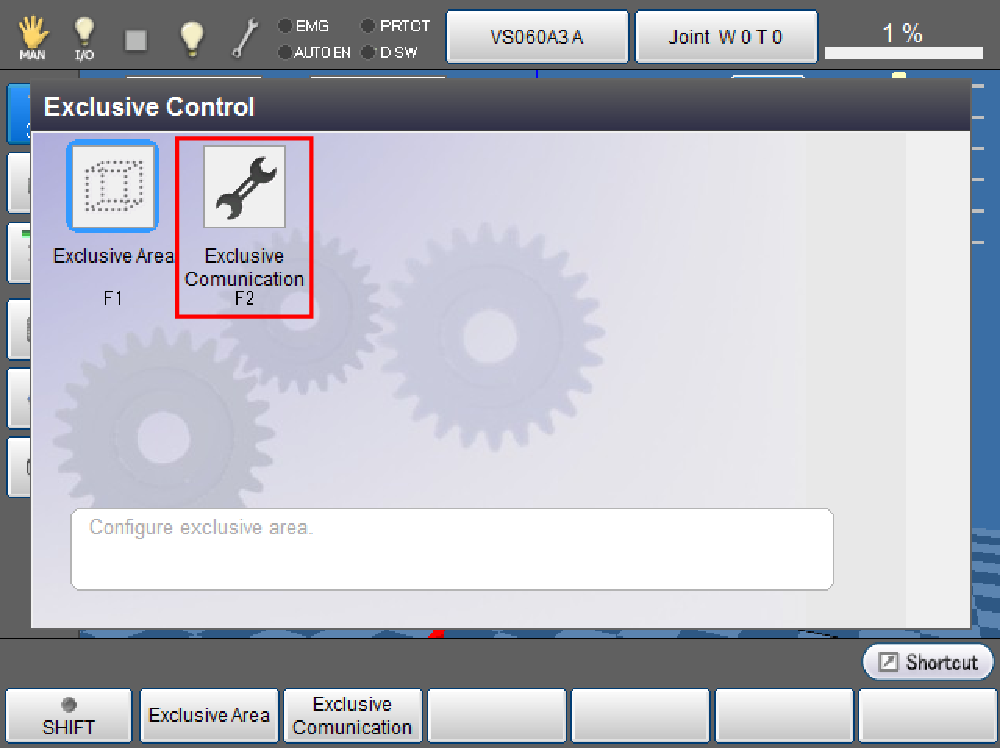
Press [F2 Exclusive Comunication] to open the screen.
Select [Exclusive control controller configuration] and press [F5 Edit], and you can select a master or slave controller.
Enter 1 to set the controller as Master, or enter 2 to set the controller as Slave, and then press [OK].
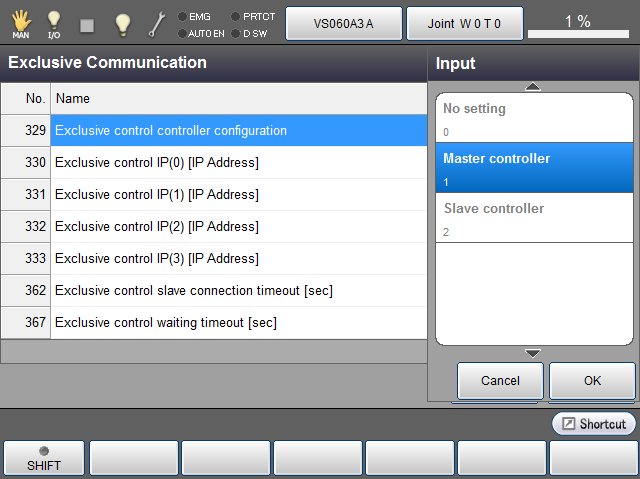
| No. | Item Name | Unit | Default | Description |
|---|---|---|---|---|
| 329 | Exclusive control controller configuration | - | 0 |
Set a robot to a master or slave controller. 0 : No setting 1: Master controller 2: Slave controller |
Configuration Required only for the Master Controller
For a master controller, configure communication settings as well.
Operation path : Basic screen - [F2 Arm] - [F6 Aux] - [F11 Exclusive Control] - [F2 Exclusive Comunication]
Press the [F5 Edit] button to open the ten key. Enter the IP address of a target controller for the exclusive control function, and press [OK].
When you enter the IP address of "0.0.0.0", the controller can be excluded from the exclusive group.
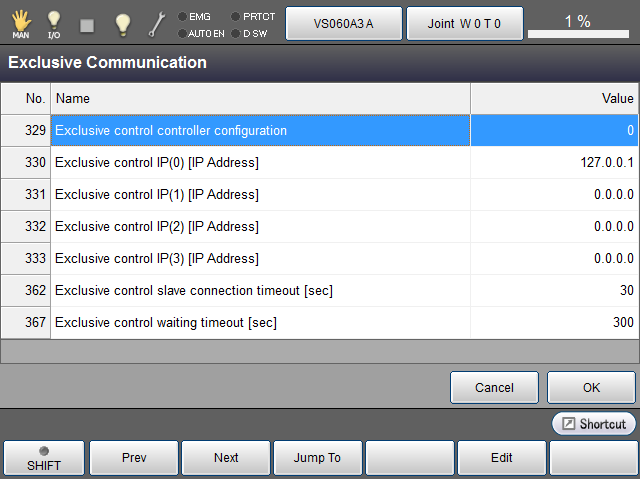
Parameter List
| No. | Item Name | Unit | Default | Description |
|---|---|---|---|---|
| 330 | Exclusive control IP(0)[IP Address] | - | 127.0.0.1 | To include the master controller into the exclusive group, use the default value. To exclude it from the exclusive group, enter "0.0.0.0". |
| 331 | Exclusive control IP(1)[IP Address] | - | 0.0.0.0 | Enter an IP address of slave controller. |
| 332 | Exclusive control IP(2)[IP Address] | - | 0.0.0.0 | Enter an IP address of slave controller. |
| 333 | Exclusive control IP(3)[IP Address] | - | 0.0.0.0 | Enter an IP address of slave controller. |
| 362 | Exclusive control slave connection timeout[sec] | sec | 30 |
Set the latency time of slave controller’s start-up. Master controller will wait the startup of slave controllers by this period. |
| 367 | Exclusive control waiting timeout [sec] | sec | 300 | Specify the upper limit of the time for the robot to wait during exclusive control. If the waiting time exceeds the specified value, the error [0x83201567:Exclusive control wait timeout.] occurs. |