
 HOME
HOME
WaitMotion
Function
This command lets the next task stand-by until the currently-running motion command is reached to the specified state.
Syntax
WaitMotion(mode[,value] )
Guaranteed Entry
- Mode
- Designate a condition code as integer type data.
- Value
- Designate the condition value defined in mode as integer type data. Not required if the value of mode is 5 or 6.
| Mode | Value | |
|---|---|---|
| Code | Meaning | |
| 0 | Motion ratio [%] | 0~100% |
| 1 | Specified distance from motion start [mm] | |
| 2 | Specified distance to motion finish [mm] | |
| 3 | Specified movement time from motion start [ms] | |
| 4 | Specified movement time to motion finish [ms] | |
| 5 | Acceleration finish | Not required |
| 6 | Deceleration start | Not required |
Return Value
Returns the state as integer type data.
| 0 | Abnormal |
| -1 | Normal |
| -2 | “-2” is returned when one of the following condition is satisfied.
|
| -3 | “-3” is returned when one of the following condition is satisfied.
|
Description
- If WaitMotion is executed during the motion command execution of own task, this command let the non-motion command standby until the currently running command is reached to the specified state.
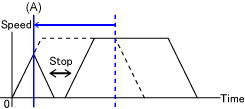
For example, this can be used by performing I/O output before the motion finishes to prepare for work after the motion finishes. - The release timing of the task standby state in each mode is as follows. At the time of (A) in the graph below, the task standby state is released then the non-motion command is executed.
Mode Without instantaneous stop With instantaneous stop 0 The task standby state is released when the motion distance from the motion start point reaches to the specified ratio.
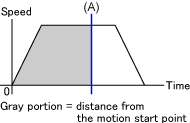
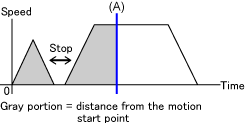
1 The task standby state is released when the motion distance from the motion start point reaches to the specified distance(mm). 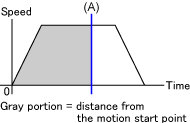
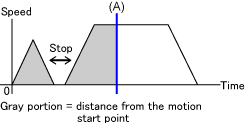
2 The task standby state is released when the motion distance from the motion finish point reaches to the specified distance(mm). 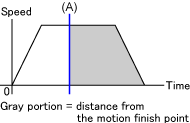
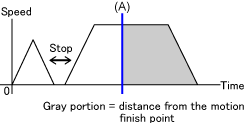
3 The task standby state is released when the motion time from the motion start timing exceeds specified period of time. (ms) The task standby state is released when the motion time from the motion start timing (except for outage time) exceeds specified period of time. (ms) 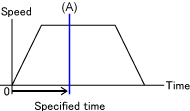
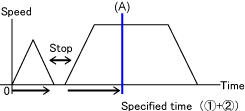
4 The task standby state is released when the motion time from the motion finish timing exceeds specified period of time. (ms) 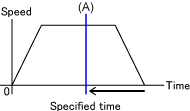
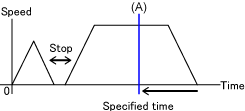
5 The task standby state is released when the acceleration completes. The task standby state is released when the instantaneous stop command turns ON and then the deceleration starts.
WaitMotion ends once Motion command stops, and is not executed again when the Motion command resumes its remained motion or executes non-motion command.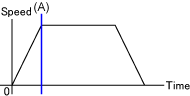
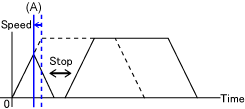
6 The task standby state is released when the deceleration starts.
The task standby state is released when the instantaneous stop command turns ON and then the deceleration starts.
WaitMotion ends once Motion command stops, and is not executed again when the Motion command resumes its remained motion or executes non-motion command.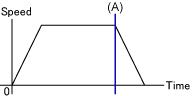
Related Terms
-
Attention
- Only CP motion can be used in modes 1 and 2.
- When the optimal speed control function is set to 2 or 3, the standby task release timing is possibly changed if the WaitMotion mode is set to Mode 3 or Mode 4 (time specified) or Mode 5 or Mode 6 (acceleration end, deceleration starts).
- If Skip command caused by MotionSkip and Interrupt in other tasks is executed during task standby state, the Skip command gets priority.
Example
'!TITLE "Wating for program"
 ' Wait until the specified motion ratio is reached.
 Sub Sample_WaitMotion

   TakeArm Keep = 1

   Dim aaa As Position

   ' Acquire the current position.
   aaa = CurPos

   'Set the internal speed to 10.
   Speed 10

   ' Start moving from the current position to P( 400, 300, 300, 180, 0, 180, -1 )
   ' and then moves to the next process.
   Move P, P( 400, 300, 300, 180, 0, 180, -1 ), Next

  bbb = WaitMotion(0,50)
     if bbb == -1 then ' If the motion ratio gets to 50% then

         ' Turn ON the I/O port number 240.
         Set IO[240]
      ' Display "1" which indicates the IO port is ON in message output window.
         PrintDbg IO[240]
     else ' If an error occurs
         ' Display S variables in message output window.
         PrintDbg S[1]
     end if
'!TITLE "Wating for program"
' Wait until the acceleration finishes.
Sub Sample_WaitMotion
TakeArm Keep = 1
Dim aaa As Position
' Acquire the current position.
aaa = CurPos
'Set the internal speed to 10.
Speed 10
' Start moving from the current position to P( 400, 300, 300, 180, 0, 180, -1 )
' and then moves to the next process.
Move L, P( 400, 300, 300, 180, 0, 180, -1 ), Next
WaitMotion 5
' Turn I/O port number 240 ON if the acceleration finishes.
Set IO[240]
' Display "1," representing ON, on the message output window.
PrintDbg IO[240]
End Sub