
 HOME
HOME
Switching Between Operation Modes
Turn the mode selector switch to the desired mode position.
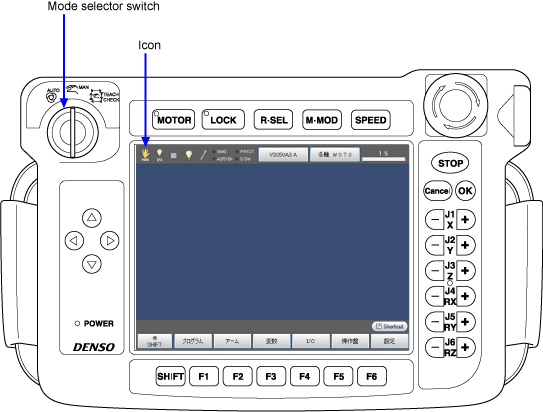
An icon of selected mode is displayed at the leftmost of the status bar.
 Auto mode Auto mode |
|
 Manual mode Manual mode |
 Teach check mode Teach check mode |
Relationship between Operation Modes and Enable Auto Input Signal
- Turning this signal ON (shorting) enables switching to Auto mode. (Dual line)
- If the enable auto is released during Auto mode, motor turns OFF(continue stop) then issues an error. The mode turns to the manual mode.
| Operation mode | Enable Auto input signal |
|---|---|
| Manual mode | Not related to Enable Auto input signal |
| Teach check mode | |
| Auto mode | ON (short-circuited) |