HOME
HOME
General Information
Built-in Vision is a function of a robot controller to process images. Using Built-in Vision allows you to process images without installing other visual controllers.
To use Built-in Vision, directly connect the FA camera to the robot controller as shown below.
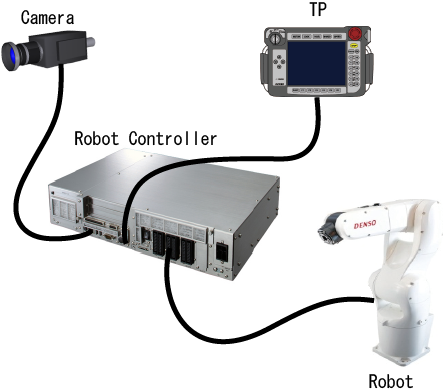
Connectable FA cameras are the following.
-
USB Camera
Connect a FA camera to a USB port of the robot controller to use.
For RC8, a USB camera that supports following camera driver is available.
・uEye_4.22.00_32 (up to Ver.1.8.3) : USB2 uEye SE,RE,ME series, etc. (XS is not supported)
・uEye_4.30.00_32_WHQL(Ver.1.9.6 or higher): USB2 uEye SE,RE,ME,XS series, etc. -
GigE Camera
Connect a FA camera to a LAN port of the robot controller to use.
For RC8 controller, GigE-supported area sensor cameras "ace series" manufactured by Basler are available.
(GigE: Gigabit Ethernet) -
Network camera
Connect a network camera to a LAN port of the robot controller to use.
For RC8 controller, network cameras "WebView Livescope series" manufactured by Canon are available.
Wiring instruction for setting and adjustment
Setting and adjustment of Built-in Vision are performed by checking the data processing and the processed image with a computer.
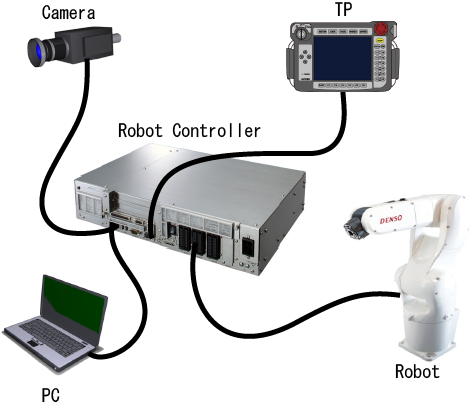
For USB Camera
Connect a computer to a LAN port of the robot controller.
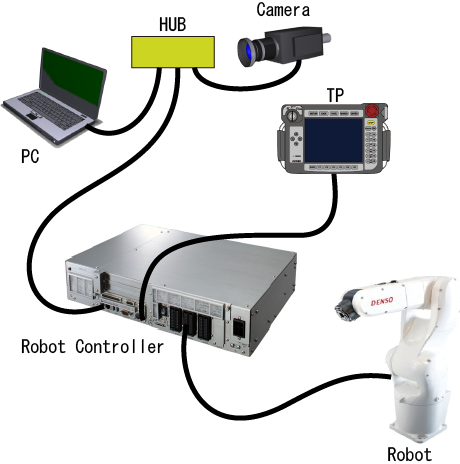
For Gig-E camera and Network camera
Because the robot controller equips only one LAN port, you need to use a hub to connect both computer and camera. After setting and adjustment has completed, disconnect the hub and then directly connect the camera to the robot controller.