
 HOME
HOME
ID : 3316
How to Use Force Sensor in Cooperative Control Function
This function is available to the robot controller which software version is 2.5.* or higher.
Force sensors connected to each robot controller can be configured from the master controller-connected teach pendant.
In programming, a robot name is used to specify a force sensor to read information.
The following describes the above-mentioned information in two sections.
Configuration
Basically, force sensors can be configured from the master controller. However, following operations must be done from the applicable robot controllers.
- Software license for the compliance function with force sensor must be registered on the license-target robot controller . For example, if you purchase a license for Robot1 (slave controller), register the license on the robot controller of Robot1.
- RS-422A communication setting for the force sensor must be done with an RS-422A communication board-installed or an RS-422A micro converter-installed robot controller.
License Registration
In each robot controller, if the license is installed in any robot controller, all robots can use the force sensor.
Connect a teach pendant or mini pendant to a robot controller which is the target of the purchased license, and then register a license.
For example, if you purchase a license for Robot1 (slave controller), connect a teach pendant or mini pendant to the robot controller of Robot1, and then register the license.
Communication Setting of RS422-A
FIFO buffer enable setting in the RS-422A communication setting must be done with an RS-422A-installed robot controller or an RS-422A micro converter-installed robot controller.
Suppose that an RS-422A communication board is installed in Robot1 (slave controller). In this case, connect a teach pendant or mini pendant to the robot controller of Robot1, and then enable the FIFO buffer.
For information about FIFO buffer setting, refer to "Enabling a FIFO Buffer".
Designate a Setting-Target Robot as Leader Robot
Basically, any configuration with the master controller-connected teach pendant works on the robot which is assigned as a leader.
Therefore, to configure a slave controller-connected force sensor, set a robot connected to the slave controller as a leader.
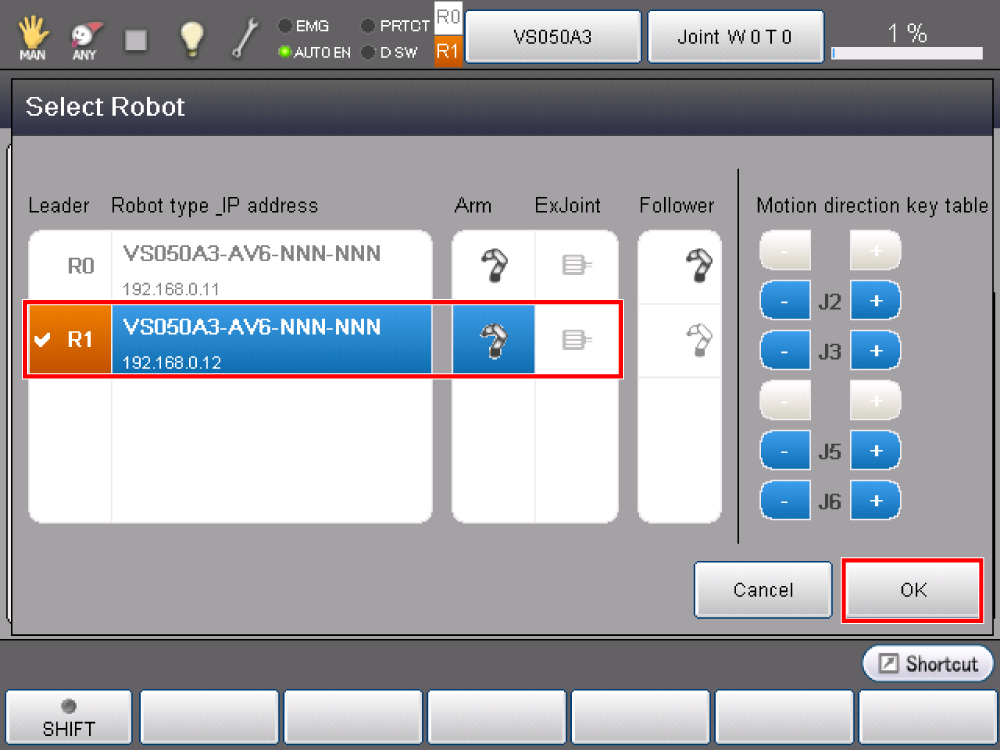
The following is a sample window image when two robots are linked for cooperation.
On the top of the window, press [Select Robot]. Press [R1], and then press [OK] to assign Robot1 as a leader.
Linkage between Robot Names and Force Sensors
The method of the robot name-force sensor linkage differs depending on the RS-422A device being used (RS-422A communication board or RS-422A micro converter).
Refer to the following links.
- Robot Name-Force Sensor Linkage When Using RS-422A Communication Board
- Robot Name-Force Sensor Linkage When Using RS-422A Micro Converter
Other Examples
Refer to "Sensor Setting" and "Parameter Setting".
Command
Write a robot name in front of the force sensor command for use.
For example, to reset the force sensor on Robot0, write as follows.
Robot0.ForceSensor 0ID : 3316