
 HOME
HOME
ID : 7643
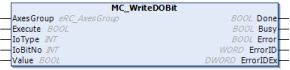
MC_WriteDOBit
To write an I/O output signal of robot controller. (Bit)
| Graphic expression | FB category |
|---|---|
 |
Non motion |
Input and Output Variable
| Variable name | Data type | Valid range | Default | Omission (*) |
|---|---|---|---|---|
| AxesGroup | eRC_AxesGroup | No | ||
|
||||
Input Variable
| Variable name | Data type | Valid range | Default | Omission (*) |
|---|---|---|---|---|
| Execute | Boolean |
|
FALSE | No |
|
||||
| IoType | Integer | 0,1 | 0 | Yes |
|
||||
| IoBitNo | Integer |
|
0 | Yes |
|
||||
| Value | Boolean |
|
FALSE | Yes |
|
||||
(*) : For some Variable, entries can be omitted.
- Yes : Entry can be omitted.
- No : Entry required always.
Output Variable
| Variable name | Data type / Description |
|---|---|
| Done | Boolean |
|
|
| Busy | Boolean |
|
|
| Error | Boolean |
|
|
| ErrorID | Word |
|
|
| ErrorIDEx | DWord |
|
Function Description
This function block writes an I/O output signal of robot controller.
Robot controller's port number corresponding to the bit number will be turned ON/OFF. For example, to turn ON the port number 20 of the robot controller, specify IoType : 1, IoBitNo : 4, and Value :TRUE.
The following tables show the correspondence between robot controller port number and bit number.
- Hand I/O
IoBitNo Robot controller port number Robot controller I/O name 0 64 Hand output 1 65 Hand output 2 66 Hand output 3 67 Hand output 4 68 Hand output 5 69 Hand output 6 70 Hand output 7
71 Hand output - Mini I/O
IoBitNo Robot controller port number Robot controller I/O name 0 16 CPU Normal 1 17 User output 2 18 User output 3 19 User output 4 20 User output 5 21 User output 6 22 User output 7
23 User output 8 24 User output 9 25 User output 10 26 User output 11 27 User output 12 28 User output 13 29 User output 14 30 User output 15 31 User output
Attention
This function block is available only when the I/O allocation of Mini I/O is "All user I/O".
ID : 7643