HOME
HOME
4th-axis CALSET position
The 4th axis physically rotates 360°or more but it is not a boundless rotation joint. It has no mechanical ends.
Follow the procedure below and set the 4th axis in a correct CALSET position.
Performing CALSET in a wrong position may break internal wiring.
1
Release the brake of the 4th axis.
Refer to "Releasing Brakes on Individual Axes".
2
Rotate the 4th axis by hand in the positive direction (counterclockwise seen from the top end of the arm) slowly but surely until it gets blocked.
Slowly rotate the axis. If it gets blocked, do not push it hard further.
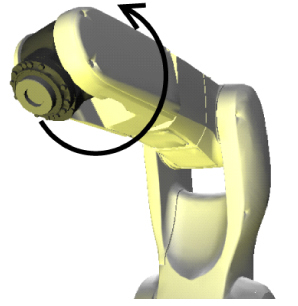
3
Rotate the 4th axis in the negative direction (clockwise seen from the top end of the arm) from the position it got blocked in STEP 2 by hand until it comes to the following position (around plus 30°).
Set the 4th-axis CALSET bolt in that position shown in the figure.
The 4th-axis CALSET bolt is stored in the encoder backup battery box.
Refer to "Encoder Backup Battery Box".
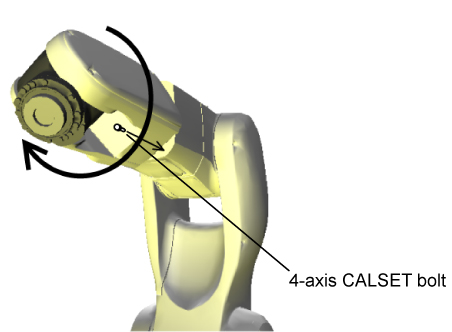
4
Rotate the 4th axis in the negative direction by hand and gently press it against the 4th-axis CALSET bolt for performing CALSET.