
 HOME
HOME
Operation Preparation Completed (output)
Function
This signal tells that the motor power is ON and the robot is in External auto mode.
Terminal number
#50 on Mini I/O connector
Usage
With this signal being ON, the robot must be in External auto mode and the motor power must be ON to run the robot from the external device.
ON conditions
This signal tells that the motor power is ON and the robot is in External auto mode.
Operation to switch to External auto mode
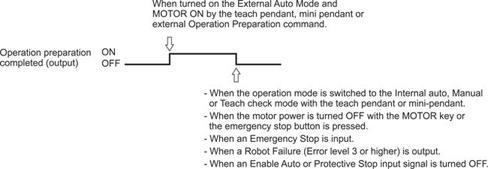
- When the External auto mode is selected on the teach pendant or mini-pendant.
- When the External auto mode is turned ON by the OPERATION PREPARATION command from the external device.
Operation to switch the MOTOR key ON
- When the MOTOR key is pushed on the teach pendant or mini-pendant.
- When the MOTOR is turned ON by the OPERATION PREPARATION command from the external device.
OFF conditions
The signal will be turned OFF under the following conditions;
- Out of the External auto mode
- Under the motor OFF.
Operation to exit External auto mode
- When internal mode is selected on the teach pendant or mini-pendant.
- When the mode selector switch of the teach pendant or mini-pendant is set to MANUAL or TEACH CHECK in External mode.
- When an Emergency Stop input signal is turned ON.
- When a Robot Error output signal is turned ON. (Except level 2 error)
- When an Enable Auto input signal is turned OFF.
- When a Protective Stop input signal is turned OFF.
Operation to switch the motor OFF
- When the motor power is turned off with the MOTOR key or the emergency stop button is pressed on the teach pendant or mini-pendant.
- When a Robot Error output signal is turned ON. If any of ERROR 6071 to 607B, 6671 to 667B and 607F occurs in the Manual mode or Teach check mode, the motor power will not be turned OFF.
To get the Operation Preparation Completed signal status using an SYSSTATE command, AND Bit 2 "Servo ON" and Bit 5 "External Mode" to use the result of the logical operation.
Timing chart
 |