
 HOME
HOME
ID : 9505
Arm Menu
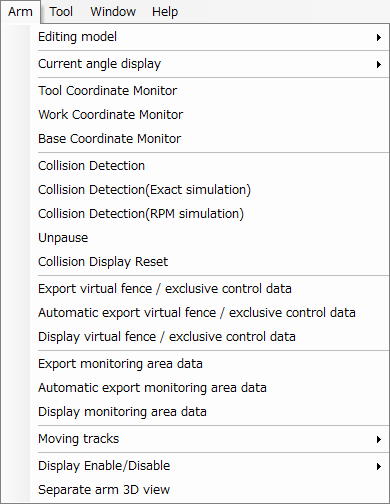
Some functions are disabled depending on the controller type and the type of the safety function.
Description of the Drop-down Menu
Editing model
Changes the display of arm modeling between [Normal] and [Safety motion].
Current Angle Display
This submenu controls the display, in the [Arm 3D View] window, of current values for arm angle variables of types P, J, T, and J+EX. It also supports copying of those values.
Tool Coordinate Monitor
This toggles the display of the current tool number and coordinate axis in the [Arm 3D View] window.
Work Coordinate Monitor
This toggles the display of the current work number and coordinate axis in the [Arm 3D View] window.
Base Coordinate Monitor
This toggles the display of the current base coordinate axis in the [Arm 3D View] window.
Collision Detection
Selecting this toggles collision detection.
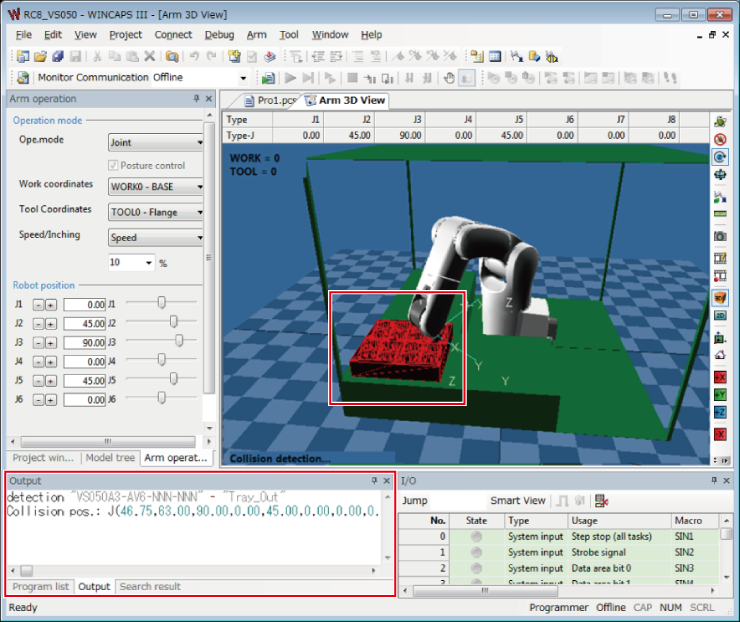
Once the collision has been detected while turned ON, the color of collision object in the window of Arm 3D View will be inverted and its position information will be displayed to the output window.
The collision with virtual fence / exclusive control makes the color of wire flame of the monitoring model inverted.
Collision Detection(Exact simulation)
This function cannot be used with the RC9 controller.
Collision Detection(RPM simulation)
This function cannot be used with the RC9 controller.
Unpause
Restarts the Exact/RPM simulation.
Collision Display Reset
This removes collision results from the display.
Export Virtual Fence / Exclusive Control Data
This exports virtual fence data or exclusive control data to the project folder.
Automatic Export Virtual Fence / Exclusive Control Data
This automatically exports virtual fence data or exclusive control data on saving the project and sending the data to controller.
Display Virtual Fence / Exclusive Control Data
This displays virtual fence data or exclusive control data on the arm 3D screen.
Export monitoring area data
Outputs the monitoring area data to the project folder.
This function is dedicated to the safety motion specification.
Automatic export monitoring area data
Outputs the monitoring area data when project is saved or when data is sent to the controller.
This function is dedicated to the safety motion specification.
Display monitoring area data
Displays the monitoring area data to the arm 3D view.
This function is dedicated to the safety motion specification.
Moving Tracks
Set the display of the trajectory the robot moved through.
Display Enable/Disable
This submenu controls display of elements in the Arm 3D view window: floor, arm, tool, work, area, exclusive area, and objects.
Separate arm 3D view
Selecting this check box will display the arm 3D view independently from the WINCAPSIII client area.
ID : 9505