
 HOME
HOME
ID : 9506
Tool Menu
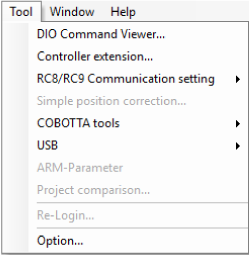
Description of the Drop-down Menu
DIO Command Viewer
This displays the DIO command viewer dialog box for displaying standard command patterns or those with mini I/O assignments. During debugging, this dialog box also allows batch setting of command patterns for dummy I/O.
Controller Extention
This menu allows to set DENSO robot option functions by using WINCAPSIII. This is available only in the online monitoring mode.
For the operation procedure, refer to “Registering License”.
RC8/RC9 Communication settings
From the WINCAPSIII, set the [Executable token setting], [IP setting], and [Data communication setting].
Do the following two steps.
1
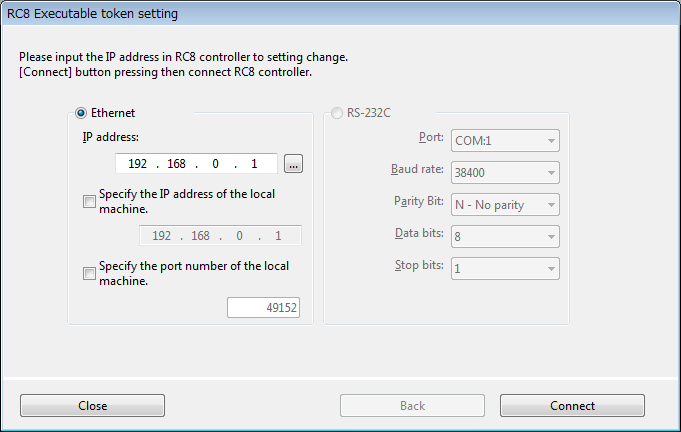
Enter the IP address of the target controller, and then click [Connect].
To connect, you need to enter a password of a user account User level "Programmer" or higher) set to RC9.
2
Enter the necessary items and click [Change setting].
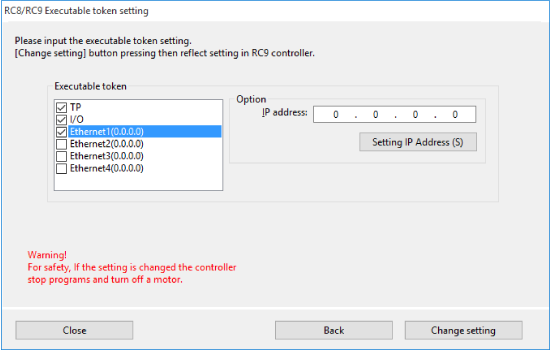
- Executable token setting
From the Executable token pane, select the executable token of RC9.
- IP setting
Set the IP address of RC9.
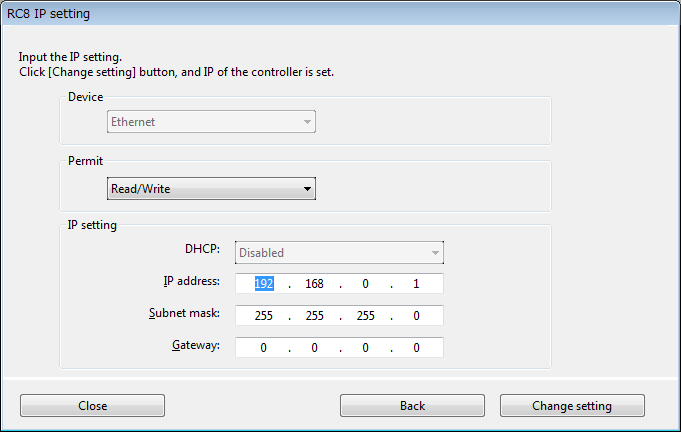
Be sure to make a note of the IP address you entered.
- Data communication setting
Select a device. Change item values.

Simple Position Correction Function
This function cannot be used currently.
USB
This is for reading or writing project data from/to a USB memory.
Writing function is exclusive for the RC7M controller.
ARM-Parameter
Reads/writes arm parameters needed for controller settings.
Project Comparison
Compare the project which is currently opened by WINCAPSIII and controller data, and then display the list of the result in additional window.
Comparison Results

Make sure to establish communication between WINCAPSIII and the controller, because this function requires receiving data from the controller.
Re-Login
This returns to the dialog box for logging in, the only way to changing user levels while WINCAPSIII is running
Option
This displays the dialog box for configuring such software options as the editor's syntax highlighting colors and communications time out limits.
The following functions are exclusive functions for the RC7M controller and not available for the RC9 robot controller.
- Controller Extension
ID : 9506