
 HOME
HOME
ID : 9509
Toolbar
The toolbars provide user alternate access to most menu items with button icons.
Alternatively, you can save screen real estate by turning them off, all or individually.
There are seven types of tool bars. The following lists map their buttons to the corresponding menu items.
Standard Toolbar

| A: | New Project |
| B: | Open Project... |
| C: | Save Project |
| D: | Save |
| E: | Cut |
| F: | Copy |
| G: | Paste |
| H: | Delete |
| I: | Find... |
| J: | Undo |
| K: | Redo |
| L: | Create Programs... |
| M: | Check Grammar |
| N: | Make Executable |
Edit Toolbar

| A: | Command List |
| B: | Indent |
| C: | Unindent |
| D: | Encomment |
| E: | Decomment |
| F: | Set/Clear Bookmark |
| G: | Next Bookmark |
| H: | Previous Bookmark |
| I: | Clear Bookmarks |
TP Status Toolbar

The status of the smart TP is displayed in the online mode.
For details of each icon, refer to "the linked page".
View Toolbar
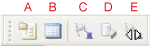
| A: | Project View |
| B: | Program list |
| C: | Arm 3D view |
| D: | Arm Modeling |
| E: | Arm operation |
Communication Mode Toolbar

| A: | Transfer Data |
| B: | Monitor Communication |
Debug Toolbar

| A: | Simulation mode |
| B: | Start a Task |
| C: | Step In |
| D: | Continue All Tasks |
| E: | Halt |
| F: | Step-stop |
| G: | Cycle-stop |
| H: | Program Reset |
| I: | Reset All Tasks |
| J: | Toggle Breakpoint |
Log Toolbar

| A: | Set/Reset Logs Start Line |
| B: | Set/Reset Logs Stop Line |
| C: | Set/Reset Logs Clear Line |
| D: | Set/Reset Control Log Start Line |
| E: | Set/Reset Control Log End Line |
| F: | Set/Reset Trace Log Start Line |
| G: | Set/Reset Trace Log End Line |
| H: | Set/Reset Variable Log Start Line |
| I: | Set/Reset Variable Log End Line |
| J: | Single-trace Log |
ID : 9509