
 HOME
HOME
ID : 9632
Top Window and Icons
Commands for Smart TP
Tapping keys, buttons, and switches on the Smart TP will display various windows on the screen.
Each screen has its own command menu.In the command menu, press function keys to select command.
Basic Screen
Display the basic screen.Commands in the command menu can be sequentially reached from this basic screen.
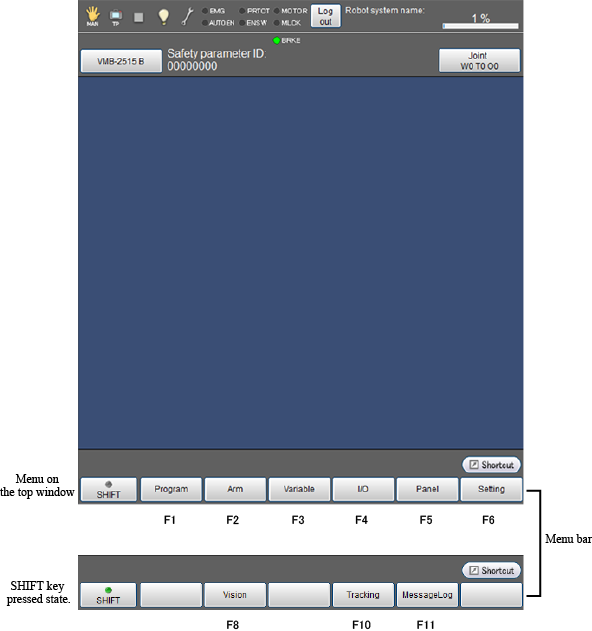
The language selection screen is displayed when turning on the controller for the first time.
Icons
For details of icons displayed in the status bar on the basic screen, refer to the following list.
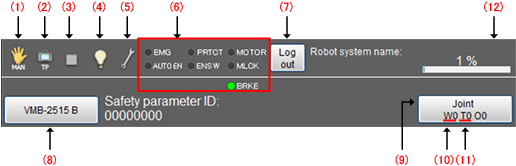
| № | Name | Description | |
|---|---|---|---|
| (1) | Move mode |  |
Auto mode |
 |
Manual mode | ||
 |
Transmitting to PC | ||
 |
Receiving from PC | ||
 |
Write data into USB memory | ||
 |
Read data in USB memory | ||
| (2) | Executable token |  |
Several input devices are selected. |
 |
COM | ||
 |
EtherNet | ||
 |
I/O | ||
 |
TP | ||
| (3) | Program running |  |
Program is under suspension. |
 |
Program is executing | ||
 |
Supervisory task is executing | ||
 |
Program and supervisory task are executing | ||
 |
Message output (Display when PrintMsg command execution) | ||
 |
Vicinity of the singular point (Sound the warning alarm when in the vicinity of the singular point) | ||
| (4) | I/O status/Arm status *Tapping each icon will display the detailed information of the icon. |
 |
Pseudo input unused and I/O lock unused (Note)I/O lock:Limit I/O communication with external devices |
 |
Pseudo input used or I/O locked | ||
| (5) | System state |  |
Normal |
 |
Abnormal
|
||
| (6) | Switch input state | EMG | Emergency stop state |
| AUTO EN | Auto enable state | ||
| PRTCT | Protective stop state | ||
| ENSW | Enabling switch is active. | ||
| MOTOR |
Motor is ON. |
||
| MLCK | Machine locked status | ||
| BRKE | Motor brake is active. | ||
| (7) | Logout button | To logout currently used account. | |
| (8) | Robot selection button | Select and display the robot type | |
| (9) | Move mode | J : Each axis P : X-Y T : Tool |
|
| (10) | Work coordinate | Display the selected work number. | |
| (11) | Tool coordinate | Display the selected tool number. | |
| (12) | Velocity button | Setting and display of the external speed. | |
ID : 9632