
 HOME
HOME
ID : 9631
How to Hold a Smart TP and Enabling Switch
How to Hold
Hold a Smart TP with one hand. Smart TP is designed for both the left and right hand hand operation, so you can hold it as you like.
You can change the left and right of the hand strap.
| Left hand held | Right hand held |
|---|---|
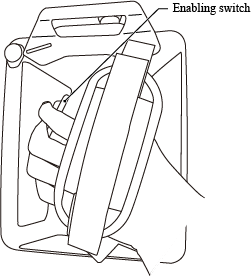 |
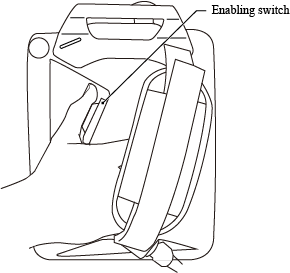 |
Enabling Switch
The enabling switch is provided to stop the robot automatically and safely when an operator can no longer operate the robot correctly due to unforeseen circumstances such as the operator suffering a blackout or dying while running the robot manually with the Smart TP. If an operator becomes such state, the switch will be pressed with either very weak or very strong force. The enabling switch is a 3-position switch which is able to recognize and react to the following 3 operating status.
- If switch is not pressed or pressed lightly → Switch is OFF.
- If switch is pressed with medium pressure → Switch is ON.
- If switch is pressed too hard → Switch is OFF.
Robot stops and is not operable unless switch is ON.
To ensure your safety, the Smart TP is designed so that the robot does not move unless both motion direction key and enabling switch are pressed at the same time when in manual mode.
Never keep the enabling switch held down with adhesive tape or alike. In doing so, operator can’t stop robot motion when needed under the manual mode. It is highly dangerous.
ID : 9631