
 HOME
HOME
ID : 9636
Password Entry Keypad
When you enter the password for the operation mode change, a specific entry keypad appears.
Window Layout
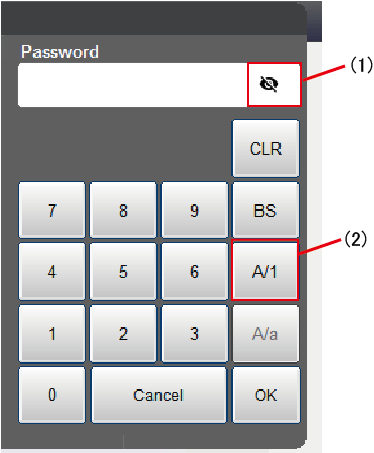
Numerical Entry Mode
Allows to enter numerical values.
| No. | Button name | Usage | |
|---|---|---|---|
| (1) |  |
Show/Hide password button | Changes whether the password is displayed as-is, or the password is masked with asterisks (*) and then displayed. For details, refer to the following "Show/Hide password." |
| (2) |  |
Numeric/Alphabet Change button |
Changes the entry mode between the numerical entry mode and the alphabet entry mode. |
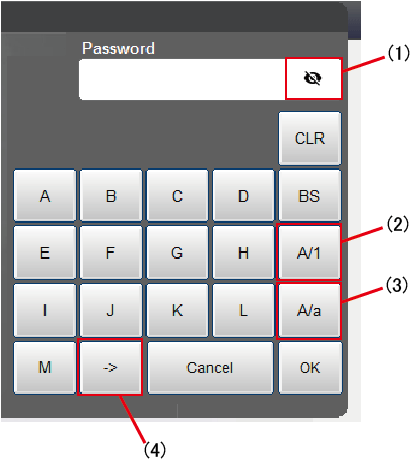
Alphabet Entry Mode
Allows to enter alphabets.
Alphabets are not allowed for the login password.
| No. | Button name | Usage | |
|---|---|---|---|
| (1) |  |
Show/Hide password button | Changes whether the password is displayed as-is, or the password is masked with asterisks (*) and then displayed. For details, refer to the following "Show/Hide password." |
| (2) |  |
Numeric/Alphabet Change button |
Changes the entry mode between the numerical entry mode and the alphabet entry mode. |
| (3) |  |
Uppercase/Lowercase change button |
Changes the button caption between uppercase and lowercase |
| (4) |  |
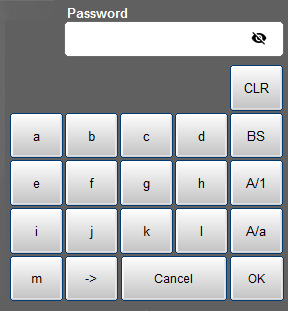
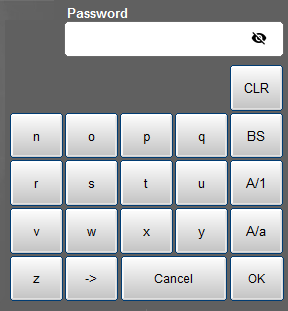
Alphabet list change button | Changes the button caption between A-M and N-Z. |
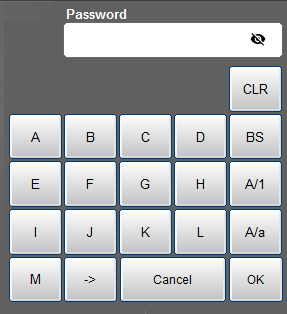
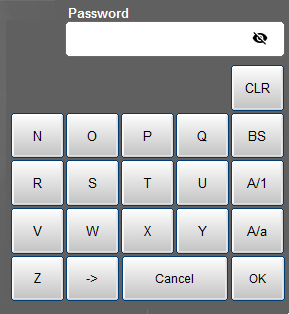
Display Variation of English Alphabet Mode
Uppercase A - M |
 |
Uppercase N - Z |
 |
Lowercase a - m |
 |
Lowercase n - z |
 |
Show/Hide Password
Clicking the [Show/Hide password] button will change the display style between the Hide state (password is masked with asterisks (*) and displayed) and the Show state (password is displayed as-is). The default setting is the Hide state.
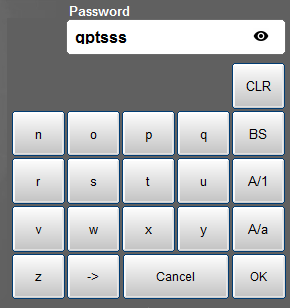
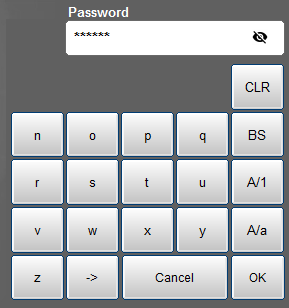
The icon of the Show/Hide password button is different in the Show state and in the Hide state as the following figures.
Show State
Displays the password as-is.
Hide State (Default)
Converts the password to asterisks and then displays.
ID : 9636