
 HOME
HOME
ID : 9642
How to Disconnect the Smart TP
There are two ways to disconnect the Smart TP.
- Turn OFF robot controller
- Disconnect from the setting
For either operation, turn the motor power off beforehand.
Turn the Motor Power OFF
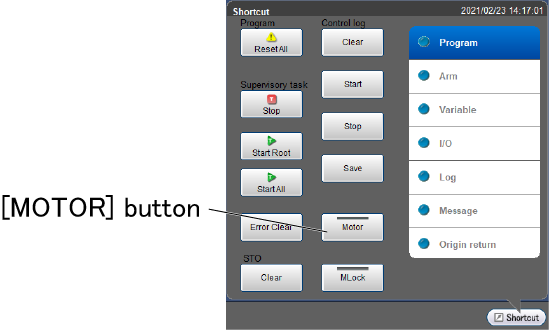
From the shortcut menu, tap the [MOTOR] button.
Once the motor power turns off, the LED of [MOTOR] button lights off.
Turn OFF Robot Controller
Turn the breaker on the front of the robot controller to OFF side (anti-clockwise).
Disconnect from the Setting
Operation path : [F6 Setting]-[F3 Pemdant and Panel]-[F4 Dis counnect Pendant]
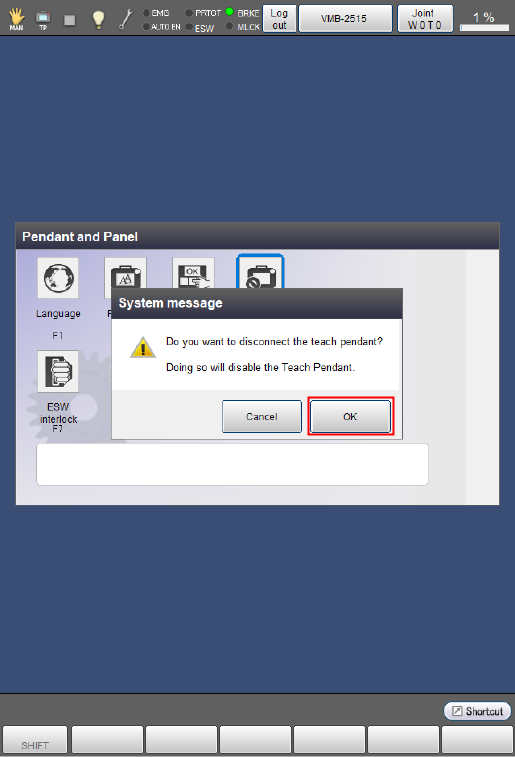
In the [Pendant and Panel] window, tap [F4 Disconnect Pendant].
Once a system message appears, tap [OK] to disconnect the Smart TP.
ID : 9642