
 HOME
HOME
ID : 9938
Program Check Option
What Is Program Check?
Program check is a function available in Auto mode to allow operators to run a program rapidly and review it from outside of the safety fence. From the mini-pendant, operators can run the robot automatically and conduct a final check to make sure a teaching-completed program runs as intended.
Manual operation and variable move with the mini-pendant are available just as in Manual mode while the program check remains selected.
Setting Procedures
1
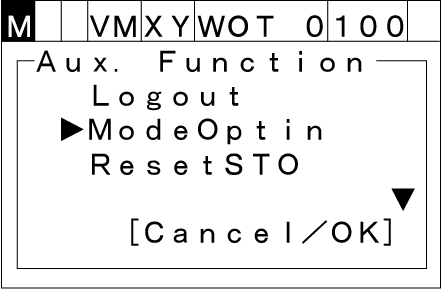
Press the [AUX] key. The following [Aux. Function] window will be displayed. Select [ModeOptin] with the up and down cursor keys.
2
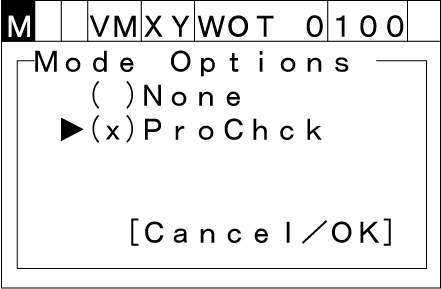
Press the [OK] key and select the Auto mode options.
When you set the cursor to [Prochck] and press the [OK] key, the check mark "x” will be displayed in the brackets "()".
3
Press the [OK] key to complete the setting.
Restrictions
- Selecting the program check will automatically set the motion speed to 10%. After selecting the program check, you can change the motion speed up to the same as in the normal Auto mode.
- During the manual operation or variable move, the maximum speed of the robot is limited to 250 mm/s or less at the flange (mechanical interface) or the tool center point (TCP).
- The robot can operate only when both the enabling switch and the [OK] key are being pressed down.
- In the program check, you cannot run several programs simultaneously. Therefore, any motion command to run several programs simultaneously will be ignored.
ID : 9938
- Related Information
- Single-Cycle Check
- Step Start