
 HOME
HOME
ID : 9942
Reconfiguring I/O Signals
Key
[I/O] ([SHIFT] + [STEP START])
I/O Port and I/O Allocation
Symbols of I/O port and I/O allocation listed below table are displayed on the mini-pendant.
| I/O port | Symbol |
|---|---|
| User input | GI |
| User output | GO |
| System input | DI |
| System output | DO |
| Hand input | HI |
| Hand output | HO |
| Internal I/O | IT |
| CC-Link system input area | SI |
| CC-Link system output area | SO |
| CC-Link remote register input area (RWw) | WI |
| CC-Link remote register output area (RWr) | WO |
| I/O allocation | Symbol |
|---|---|
| Selectable I/O | Selctbl |
| DeviceNet master allocation | DVMastr |
| Standard allocation | Standrd |
Operation
1
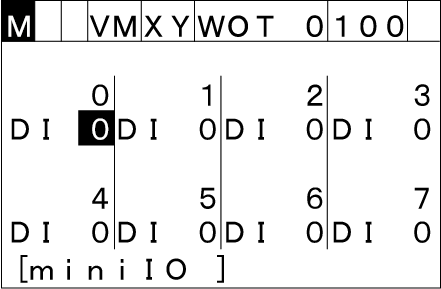
Press [I/O] to call up the I/O signal truth table as shown below.
2
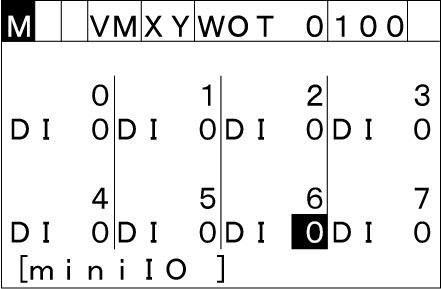
To change the truth status assigned to I/O lines, choose the line with the up, down, left, and right cursor keys.
3
Press [MENU] call up the "Functions" screen that handles I/O signals.
To return to the I/O signal truth table, press [Cancel].
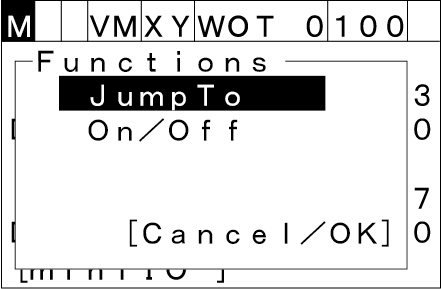
Choose one of handles with the up and down cursor keys, then press [OK].
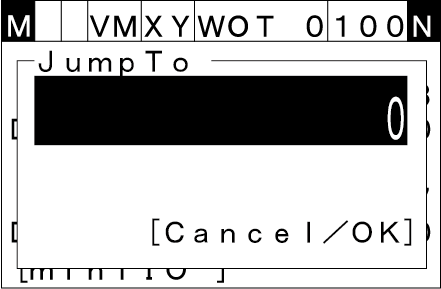
JumpTo
If you choose [JumpTo] with the up and down cursor keys, the JumpTo screen appears. Enter an I/O line number you want to jump to, into the highlighted line and then press [OK].
To discard the new setting and return to the I/O signal truth table, press [Cancel].
On/Off
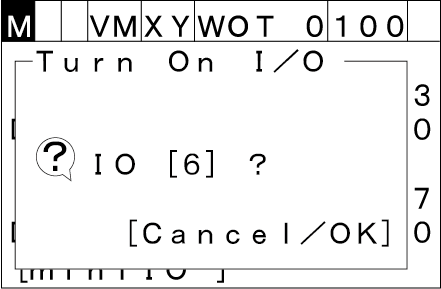
If you choose [On/Off] with the up and down cursor keys and press [OK], then the following screen appears where you can reverse the truth assignment of the line.
To discard the new setting and return to the I/O signal truth table, press [Cancel].
ID : 9942