
 HOME
HOME
ID : 9964
Setting the Speed, Acceleration, and Deceleration
The speed of robot is determined by internal speed and external speed.
The internal speed is the speed determined by the commands in the program.
External speed is the speed to be set using the Smart TP or mini-pendant for teaching or test run, and the unit is expressed in percentage (%) of the maximum speed (internal speed).
Note on Speed Setting
- The initial value of the external speed is 1% when power is turned on.
- Once the external speed is set, it is valid until the controller is turned off or the setting is updated.
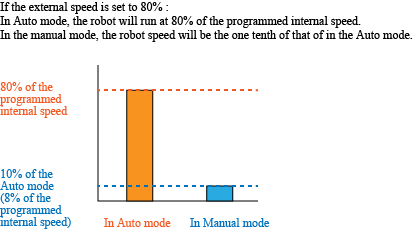
- Actual robot moves at [internal speed x external speed (%)] when in Auto mode. For example, if the external speed is set at 80%, the robot moves at internal speed x 80%.
It moves at 10% of the internal speed in Manual mode or Auto mode (when the program check option is selected). For example, if the external speed is set at 80%, it moves at 10%×80% (i.e. 8%). The example of actual operating speed is given in the figure below. - When speed is set, acceleration and deceleration will be automatically calculated by the following equation.
Acceleration (%) = ((Speed) / 100)2 x 100
Deceleration (%) = ((Speed) / 100)2 x 100
(Calculation example) Assuming that speed is 20% :
Acceleration (Deceleration) = (20 / 100)2 x 100 = 4%
These automatically calculated values can be modified by the Smart TP or mini-pendant. In that case, the latest modified value will be valid.
 |
ID : 9964