
 HOME
HOME
ID : 10161
System Configuration
The following figure shows a VMB robot system configuration.
In the below of this figure, there are simple descriptions of the components.
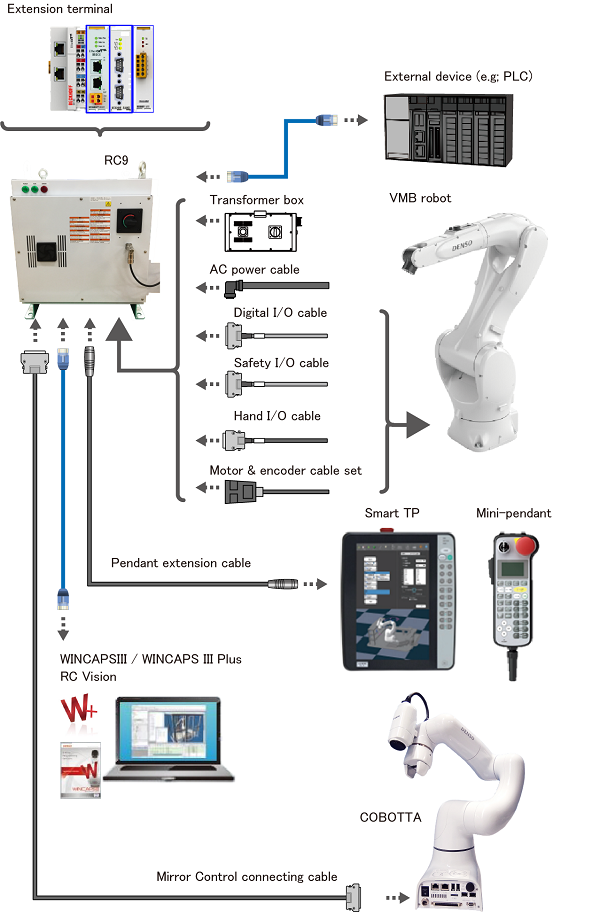
Standard Components
- VMB robot
- Robot unit that is run by customer-created program.
- RC9
- Robot controller that equips robot controlling functions and realizes high-speed processing. RC9 can be provided as firmware.
Required Option
- AC power cable
- To supply power to RC9.
- Safety I/O cable
- This cable includes safety-related signals. Use this cable to connect a robot controller to a robot unit.
- Motor & encoder cable set
- Cable set that connects the robot unit to the robot controller, consisting of a motor cable and an encoder cable.
Options
- Power transformer box
- This device enables robot to operate at the voltage levels applied in a country where the robot is used.
- Digital I/O cable
- Cable that includes robot signal lines. Use this cable to connect a robot controller to a robot unit.
- Hand I/O cable
- Cable that includes signal lines for a robot-installed tool. Use this cable to connect a robot controller to a robot unit.
- Pendant extension cable
- Pendant extension cable for Smart TP and mini-pendant.
- Mirror Control connecting cable
- Cable for the Mirror Control function.
- Smart TP
- Control device to operate a robot and to create a robot program.
- Mini-pendant
- Control device to operate a robot and to create a robot program.
- WINCAPS III
- Robot programming and simulation software.
- WINCAPS Plus
- Using with WINCAPS III, this provides optimal application for each stage of product life cycle; design, installation, and maintenance.
- RC Vision (EVP2)
- Program-less image processing application that is specifically designed for "Pick&Place" operation.
- Extension terminal
-
Extension application manufactured by Beckhoff automation.
The following software can be used for the field network master terminal.
- TwinCAT3 PLC
- TwinCAT3 HMI
- TwinCAT3 OPC UA
Customer Prepared Items
- Computer
- To control a robot and create programs.
Prepare a computer with Windows OS. - Ethenet cable
- To use a computer, or to connect an external device.
ID : 10161
- Related Information
- I/O Expansion Options
- Software Options