
 HOME
HOME
ID : 10350
Auto Mode (output)
Function
This signal tells the external device that the robot is in Auto mode.
Terminal number
#24 on Digital I/O connector
Usage
With this signal and the Robot initialization complete signal being ON, execute the “Operation preparation” command.
ON condition
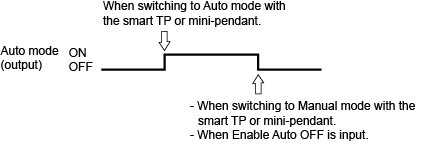
When the robot turns to Auto mode by the following operation with the Enable Auto input signal being ON, this signal will be output.
- Switching to Auto mode with the smart TP or mini-pendant.
OFF conditions
This signal will be turned OFF under the following conditions.
- Switching to Manual mode with the smart TP or mini-pendant.
- The Enable Auto input signal is OFF. The Enable Auto input signal will not be turned OFF in the pendant-less state.
The Auto Mode output signal will not be turned OFF with INSTANTANEOUS STOP, STEP STOP or CYCLE STOP commands.
Timing chart
|
ID : 10350