
 HOME
HOME
ID : 10618
Setup
This section describes preparation when using the Mirror Control.
To use the Mirror Control, it is necessary to prepare for the slave robot side and COBOTTA side.
For details of each robot preparation, refer to the following links.
Procedure
It is assumed that installation of the slave robot has been completed.
1
Install COBOTTA outside of the safety fence of the slave robot.
For installation of COBOTTA, refer to "Installation and Connection Procedures (ID : 4019)" in COBOTTA User Manuals.
2
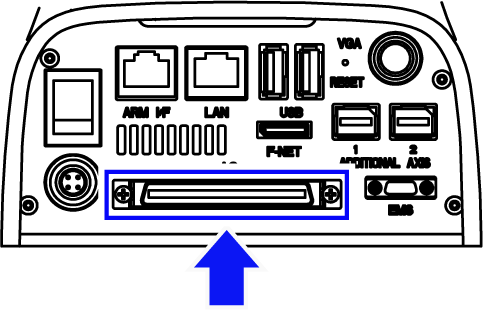
Connect the "Mirror Control connecting cable" to the Mini I/O connector of COBOTTA.
3
Connect the other side of the "Mirror Control connecting cable" to the Safety I/O connector of the RC9 controller.
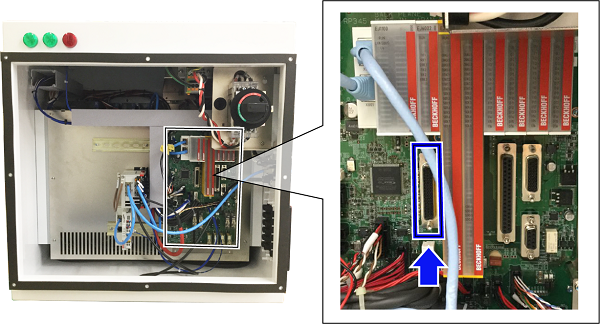
The connecting method of I/O cables differs for each model. For VMB series, refer to "Connect Each I/O Cable".
4
Connect the protective stop signals to the interlock device of the safety fence from the connector connected to the RC9 controller.
5
Connect the Ethernet cable to the Ethernet connector (for COBOTTA communication) of COBOTTA.
6
Connect the other side of the Ethernet cable to the Ethernet connector on the side of the RC9 controller.
7
Place the emergency stop box connected to COBOTTA and the smart TP connected to the RC9 controller, within the reach of your hands from the COBOTTA operating position.
This completes connecting equipment.
ID : 10618
- Related Information
- Preparation of Slave Robot Side
- Preparation of COBOTTA Side