
 HOME
HOME
ID : 10935
Torque Check Function
Torque check function is a function that generates an error if values of the torque required for robot motion and the actual torque are different significantly. An error occurs if the load setting value is wrong or make a robot collide.
Torque check function is always enabled from the time of shipment from the factory. You cannot disable this function. If an error still occurs frequently even if the load setting value is checked, refer to "When Errors Occur Frequently Even If Exact Load Information is Set".
This function is available in Ver.1.1.* or higher.
When Errors Related to Torque Check Function Occur Frequently
If the following error codes occur, loads may be applied to the robot more than expected. Check the load setting value.
| Error code | Message |
|---|---|
| 8F404591 to 8F404596 | J1 to J6: Torque deviation warning. |
| 834045A1 to 834045A6 | J1 to J6: Torque deviation error. |
| 8F4045B1 to 8F4045B6 | J1 to J6: Instantaneous torque deviation warning. |
| 834045C1 to 834045C6 | J1 to J6: Instantaneous torque deviation error. |
Setting to be checked when an error occurs
Check if the Load Setting (mass of payload, payload center of gravity and payload moment of inertia) is the actual correct load value and enter it exactly.
If you do not know the correct load information, use the Payload Estimation Function and set the load information.
When Errors Occur at Changing a Workpiece Holding State
If a workpiece is heavy, the load applied to the robot differs significantly between the holding state and the non-holding state, therefore the torque check function may work.
To avoid the error occurrence, before the motion command after changing the workpiece holding state, change the load setting properly with the Payload command.
Refer to the following example.
Example
Sub Sample_TorqueCheck

	Dim jStart As Joint
	Dim j1 As Joint
	Dim j2 As Joint

	jStart = J( 0, 60, 90, 0, 30, 0 )
	j1 = J( 0, 30, 90, 0, 60, 0 )
	j2 = J( 0, 30, 90, 0, 90, 0 )

	TakeArm Keep = 1

	Move P, jStart ' Move to the workpiece holding position

	' Program to hold a workpiece

	PayLoad 25000, V( 0, 100, 150 ) ' Set with the total weight of gripper and workpiece
	Move P, j1 ' Move with the workpiece holding state
	:
	:
	:
	' Program to release a workpiece

	PayLoad 10000, V( 0, 100, 150 ) ' Set with the weight of gripper only
	Move P, j2 ' Move with the workpiece non-holding state
	:
	:
	:
End Sub
When Errors Occur Frequently Even If Exact Load Information is Set
Loads are applied to the robot more than expected depending on the motion, an error may occur even if exact load information is set.
You can reduce the occurrence of errors or lower the error level by taking the remedy below.
1. Change the robot motion
If there is a margin for the cycle time, you can reduce the occurrence of errors by changing the motion path that the error occurs or reducing speed and acceleration.
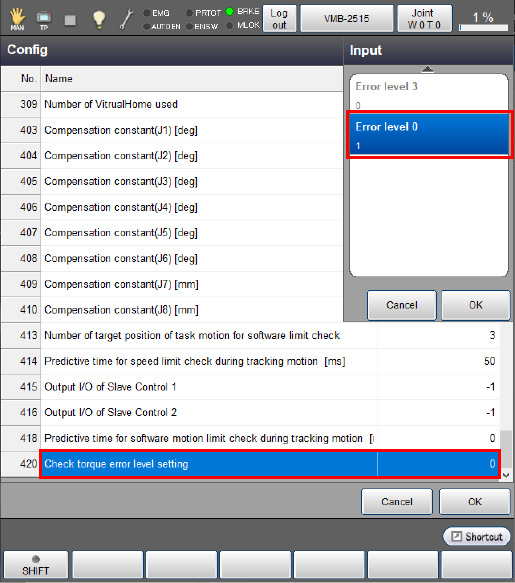
2. Change the error level to 0
If the motion cannot be changed, you can prevent the motion stop due to errors by changing the error level from the default level 3 to the level 0.
How to change the error level
Operation path:[F2 Arm] - [F6 Aux] - [F1 Config]
Change [420 : Check torque error level setting] of "Config" from "0: Error level 3" to "1: Error level 0" and press the [OK] button.
ID : 10935